Quick picks
Fujitsu ScanSnap iX1600 Wireless Document Scanner
AmazonBasics 12-Sheet Cross-Cut Paper Shredder
Pendaflex Hanging File Folders, Letter Size, Standard Green (25-Pack)
Paper Clutter and the Psychology of Deferred Decisions
Quick picks
These are the products referenced in the guide; check dimensions, material, and installation limits before ordering.
-
- Fujitsu ScanSnap iX1600 Wireless Document Scanner: Check current options on Amazon
-
- AmazonBasics 12-Sheet Cross-Cut Paper Shredder: Check current options on Amazon
-
- Pendaflex Hanging File Folders, Letter Size, Standard Green (25-Pack): Check current options on Amazon Paper clutter is uniquely resistant to ordinary organization because it represents something deeper than physical volume: it represents deferred decisions. Every piece of paper in a pile is there because at some point, a decision about it was postponed. Is this something I need to keep? For how long? Where should it live? Can I safely discard it? These decisions require cognitive effort, and the consistent human tendency to defer cognitive effort — what behavioral economists call present bias — transforms manageable paper volumes into towering piles one postponed decision at a time.
Research on organizational psychology identifies paper piles as among the most reliably stress-inducing forms of household clutter. Unlike toys or clothing, which can be organized into visible categories, paper piles are visually undifferentiated — a pile could contain a critical document or a grocery receipt from 2019, and the uncertainty about which is more stressful than knowing it’s all trash. A study published in Personality and Social Psychology Bulletin found that women in homes with clutter they described as “unfinished” showed elevated cortisol levels throughout the day — and paper piles, representing a backlog of incomplete decisions, are one of the most common forms of this “unfinished home” experience.
The solution is a structured decision framework — the keep-scan-shred method — that reduces each paper decision to a three-option choice with clear criteria for each option. By eliminating the infinite degrees of “maybe” that cause paper to pile up, the framework makes paper processing fast, complete, and sustainable.
This guide walks through the complete process: the one-time paper purge that clears the backlog, the filing system that provides a permanent home for keepers, the digital workflow for scanned documents, and the incoming paper management system that prevents future pile accumulation.
For home office organization beyond paper management, see our guide on how to organize a home office. For broader small bedroom home office contexts, see how to organize a small bedroom.
Step 1: Gather All Papers Into One Location
Like any organization project, the paper purge begins with a complete audit — and like all audits, it requires physically gathering all examples of the category being organized into one place before any decisions are made.
Collect every piece of paper in the house:
This means: the mail pile on the kitchen counter, the junk drawer paper accumulation, the bills on the desk, the papers in the home office inbox, the filing cabinet (yes, even the “already organized” filing cabinet — filing systems accumulate outdated material without regular audit), magazines, catalogs, notebooks, printed receipts, children’s artwork and school papers, and any other paper.
The goal of this gathering step is the same as it is in any audit: to see the total volume before making any decisions. Most people are genuinely surprised by how much paper they’ve accumulated, which is motivating — it reframes the project as something with genuine impact rather than a minor shuffling exercise.
Sort into broad categories during collection:
As you collect, sort into five broad physical piles:
- Financial documents (bank statements, tax documents, investment papers, bills)
- Legal and personal documents (contracts, property records, identification, medical records)
- Reference and information (manuals, warranties, recipes, health information)
- Correspondence and sentimental (cards, letters, children’s artwork)
- Junk (catalogs, advertising, duplicate notices, expired coupons)
Don’t make keep/discard decisions yet — this first sort is purely categorical, and it’s much faster than decision-making. The categories will speed up the actual decision process in Step 2.
Step 2: Apply the Keep-Scan-Shred Decision Framework
With all papers sorted into broad categories, you’re ready to apply the three-option decision framework to each pile. The framework reduces every paper decision to one of three outcomes:
KEEP (physical original): The document requires the original physical form to be useful — birth certificates, deeds, original signed contracts, medical records with original provider signatures. These documents go into the permanent file.
SCAN (digital copy, discard physical): The document has information you need to retain but doesn’t require the original physical format — tax documents, bank statements, pay stubs, insurance policies, warranties. These documents are photographed or scanned and stored digitally, and the physical paper is then shredded.
SHRED (immediate discard with secure destruction): The document contains personal information (account numbers, Social Security numbers, names and addresses, financial figures) and can be safely discarded after review. Any paper in the SHRED category should go through a cross-cut shredder, not recycling — straight-cut shredded or unshredded financial documents are usable by identity thieves.
What to do with Category 5 (Junk): Junk mail, catalogs, advertising materials, and expired coupons that don’t contain personally identifying information can go directly into the recycling bin. No scanning, no filing. This pile is often 30–40% of total paper volume — processing it first creates immediate momentum.
Work through each category systematically:
Process one category at a time, applying the keep-scan-shred decision to each document. When uncertain, default toward SCAN (retaining the information in digital form without the physical burden) rather than KEEP (which requires physical filing space) or SHRED (which is irreversible).
The decision process gets faster as you work — most document types repeat, and once you’ve decided that utility bills older than 12 months are SHRED and utility bills less than 12 months are SCAN, all subsequent utility bills are decided in under 2 seconds.
Step 3: Set Up Your Physical Filing System
For the documents you’ve decided to KEEP in physical form, you need a filing system that provides immediate, reliable retrieval when a document is needed.
Filing categories for a complete home filing system:
Active Household:
- Bills and Utilities (current year)
- Insurance Policies (all current policies)
- Vehicle (registration, maintenance records, loan documents)
- Medical (current insurance cards, primary physician information, ongoing medical records)
- Children (each child gets a sub-folder: school records, immunization records, report cards)
Financial:
- Tax Returns (one folder per year, going back 7 years minimum)
- Bank Statements (current year)
- Investment and Retirement Accounts
- Credit Card Statements (current year)
Property and Legal:
- Property Deed
- Mortgage Documents
- Lease Agreement (if renting)
- Contracts (major service agreements, warranties over $500)
Permanent/Identity:
- Birth Certificates
- Social Security Cards (these should be in a fireproof safe, not a filing cabinet)
- Passports
- Marriage/Divorce Certificates
- Wills and Trusts
- Military Records
Filing system structure:
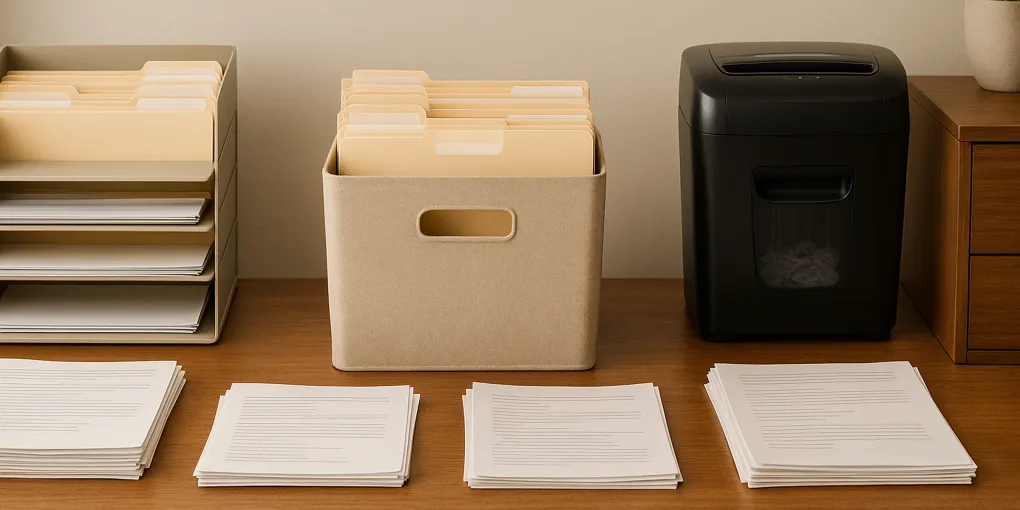
Use a hanging file folder system in a filing cabinet or a portable file box. One hanging folder per category; use interior folders within the hanging folder for sub-categories. Label all hanging folders with the category name, consistently formatted (all caps or title case, consistently).
Color-coding optional:
Color-coded hanging folders (different colors for Active Household, Financial, Property, Permanent) make visual navigation faster. If you choose color-coding, write the color key on a small card taped to the inside of the filing cabinet or box lid.
Step 4: Create Your Digital Document System
For all SCAN documents, you need a digital storage system that organizes scanned files logically and backs them up securely.
Scanning options:
Smartphone scanning: Adobe Scan (free), Apple’s built-in Notes scanner, or Microsoft Office Lens all produce PDF-quality scans from a smartphone camera. These apps automatically correct perspective, enhance contrast, and produce files that are legible and appropriate for long-term digital storage.
Flatbed scanner: A flatbed scanner (connected to a computer) produces higher-quality scans for documents that need to be referenced closely, but is slower than smartphone scanning for bulk document processing.
Sheet-feed scanner: For large-volume document digitization, a sheet-feed scanner (ScanSnap, Brother, Fujitsu) processes documents rapidly and integrates directly with document management software.
Folder structure for digital documents:
Mirror your physical filing system in your digital folder structure:
Documents/
  → Home Files/
    → Financial/
      → Tax Returns/
        → 2025 Tax Return.pdf
        → 2024 Tax Return.pdf
      → Bank Statements/
        → 2026/
        → 2025/
    → Insurance/
    → Medical/
    → Property/
File naming convention:
Use a consistent file naming format: YYYY-MM_DocumentType_Description.pdf (example: 2026-03_BankStatement_CheckingMarch2026.pdf). Date-prefixed filenames automatically sort chronologically in any folder view.
Backup requirement:
Scanned documents need at least two backups: a local copy (on your computer) and a cloud copy (Google Drive, Dropbox, iCloud, OneDrive). Financial and legal documents should be encrypted before cloud storage — use a password-protected ZIP file or enable encryption in your cloud storage service.
Step 5: Set Up an Incoming Paper Management System
The paper purge solves the backlog. The incoming paper management system prevents the backlog from rebuilding. Without an incoming system, any paper purge is temporary.
The inbox tray and weekly processing rule:
Place a single inbox tray at the primary paper entry point — wherever you typically set down mail, school papers, and other incoming documents. All incoming paper goes into the inbox tray, not onto counters, tables, or piles.
Once per week (many households do this Sunday evening or Monday morning), process the inbox: apply the keep-scan-shred framework to everything in it, file keepers, scan and shred scan-items, and dispose of junk. A weekly processing cadence prevents the inbox from growing beyond what can be handled in a single 20-minute session.
Immediate junk mail triage:
Remove advertising and junk mail from the house immediately at the mail-entry point — not “put it on the counter to recycle later.” A small recycling bin near the mail entry point, so junk mail goes directly from the mail slot to recycling, eliminates the countertop pile before it starts.
Opt-out of physical mail where possible:
Sign up for e-statements from banks, utilities, and financial institutions. Opt out of catalog mailing lists at CatalogChoice.org. Register at DMAchoice.org to reduce direct mail advertising. These steps reduce incoming paper volume at the source — the most effective long-term paper management strategy.
Paper purge tool criteria
Use these factors to compare options before ordering:
| Factor | Weight | What to check |
|---|---|---|
| Research | 30% | Depth of specification and user-report analysis and breadth of products reviewed |
| Evidence Quality | 25% | Reliability of specs, product documentation, and repeated owner-reported fit patterns |
| Value | 20% | Cost-effectiveness relative to competing products at similar quality tiers |
| User Signals | 15% | Long-term owner feedback and fit-related complaints |
| Transparency | 10% | Accuracy of manufacturer claims, material disclosures, and dimension accuracy |
Scores are differentiated — top picks typically score 8.5–9.5, mid-tier 7.0–8.4, and weak options below 7.0.
Product Recommendations
1. Fujitsu ScanSnap iX1600 Wireless Document Scanner
Check current options for Fujitsu ScanSnap iX1600 Wireless Document Scanner
The ScanSnap iX1600 is the premier home document scanner for households with significant paper management needs. The 40-page-per-minute sheet feed processes a large paper purge in hours rather than days and handles double-sided documents in a single pass. Wireless connectivity allows scanning directly to a computer, cloud storage (Dropbox, Google Drive), or email without a physical connection. The included ScanSnap Home software automatically names and sorts scanned documents using OCR text recognition.
| Criterion | Weight | Score |
|---|---|---|
| Capacity & Dimensions | 30% | 9.0/10 |
| Material Quality | 25% | 9.3/10 |
| Ease of Assembly & Use | 20% | 8.8/10 |
| Long-Term Value | 25% | 9.2/10 |
| Composite Score | 9.1/10 |
2. AmazonBasics 12-Sheet Cross-Cut Paper Shredder
Check current options for AmazonBasics 12-Sheet Cross-Cut Paper Shredder
A cross-cut shredder is a non-negotiable component of a home paper management system. This 12-sheet capacity cross-cut model handles a full paper purge’s shredding needs efficiently and maintains adequate security through the cross-cut pattern (strip-cut shredders produce reassemble-able strips; cross-cut produces small pieces). Also shreds credit cards, staples, and paper clips without jamming. Capacity indicator tells you when the collection bin needs emptying. Thermal overload protection for extended use during large paper purges.
| Criterion | Weight | Score |
|---|---|---|
| Capacity & Dimensions | 30% | 8.5/10 |
| Material Quality | 25% | 8.2/10 |
| Ease of Assembly & Use | 20% | 9.3/10 |
| Long-Term Value | 25% | 8.8/10 |
| Composite Score | 8.7/10 |
3. Pendaflex Hanging File Folders, Letter Size, Standard Green (25-Pack)
Check current options for Pendaflex Hanging File Folders, Letter Size, Standard Green (25-Pack)
The functional core of any physical filing system, these standard hanging file folders provide durable, reliable category organization in any standard filing cabinet or file box. The 25-count pack is appropriate for most complete home filing systems. Tabs and clear inserts are included. The classic green color provides a professional, consistent filing aesthetic; color-coded alternatives are available for those implementing a color-coded filing system. Compatible with all standard letter-size filing cabinets and file boxes.
| Criterion | Weight | Score |
|---|---|---|
| Capacity & Dimensions | 30% | 8.3/10 |
| Material Quality | 25% | 8.5/10 |
| Ease of Assembly & Use | 20% | 9.5/10 |
| Long-Term Value | 25% | 9.0/10 |
| Composite Score | 8.8/10 |
Maintenance: Preventing Paper Accumulation from Rebuilding
The paper management system requires three maintenance modes: weekly processing of the inbox, annual filing audit, and ongoing digital backup verification.
Weekly inbox processing (20–30 minutes):
Process the inbox to zero every week without exception. When weeks are skipped, backlog accumulates faster than most people expect — two weeks of mail and school papers can easily regenerate a pile that takes an hour to process. The 20-minute weekly cadence is more sustainable than the periodic hours-long clearing sessions that typically characterize paper pile management without a system.
Annual filing cabinet audit (45–60 minutes):
Once per year, walk through every physical filing folder. Remove and shred any documents that are past their retention period (utility bills from 3 years ago, pay stubs no longer needed). This prevents filing cabinet creep — the gradual accumulation of outdated material that eventually makes finding current documents harder.
Digital backup verification (15 minutes, annually):
Verify that your cloud backup is current and accessible. Attempt to open 3–5 recently scanned documents to confirm the files are uncorrupted and readable. Check that your cloud storage account is still active and that the linked devices are still backed up automatically.
Identity theft monitoring:
Separately from the paper management system, consider setting up credit monitoring alerts (many banks and credit cards offer free credit monitoring services). The organizational discipline of shredding sensitive documents and backing up digital files significantly reduces identity theft risk; credit monitoring provides an early detection layer on top of the organizational safeguards.
A well-executed paper purge and filing system removes one of the most persistent sources of household cognitive load — the ambient awareness of unresolved document decisions — and replaces it with a clear, legible system where every document has a definite home, a defined retention period, and a secure backup. The upfront investment in a thorough paper purge is typically a one-time effort; the ongoing system requires only consistent weekly maintenance.
Frequently Asked Questions
- General federal guidance for personal document retention: tax returns and supporting documentation, 7 years; pay stubs, 1 year or until matched to W-2; bank statements, 1 year (3–7 years if needed for tax purposes); investment statements, until account is closed plus 7 years; medical records, indefinitely; insurance policies, while active plus 3 years; property records and mortgage documents, while owned plus 7 years; contracts, while active plus 7 years; birth certificates, passports, social security cards, wills, and deeds, permanently.
- Never shred original versions of: birth certificates, death certificates, marriage and divorce certificates, adoption papers, Social Security cards, passports, military discharge papers (DD-214), wills and trusts, property deeds and titles, vehicle titles, original stock certificates, and immigration documents. Scan these documents to create digital backups, and store the originals in a fireproof safe or safety deposit box.
- Scanning for digital backup is appropriate for most documents. However, ensure digital copies are stored in multiple locations — a local folder alone is insufficient; include a cloud backup (Dropbox, Google Drive, iCloud, or similar). Encrypt any digital folder containing sensitive financial or identification documents. Once a secure digital backup exists, shredding the physical document (rather than simply discarding) is still essential — financial documents with account numbers, SSNs, or similar data are identity theft risks even in your own trash.
- The most effective incoming paper management system involves processing mail at the point of entry — not setting it down, but immediately sorting it: discard junk mail directly, open and action immediate-response items, and file or scan items that need to be retained. A physical inbox tray near the mail entry point holds anything that requires more than 30 seconds of attention, and this tray is processed weekly. The goal is zero paper on countertops and tables by treating paper as an action item that must be processed, not a possession that can be set down indefinitely.