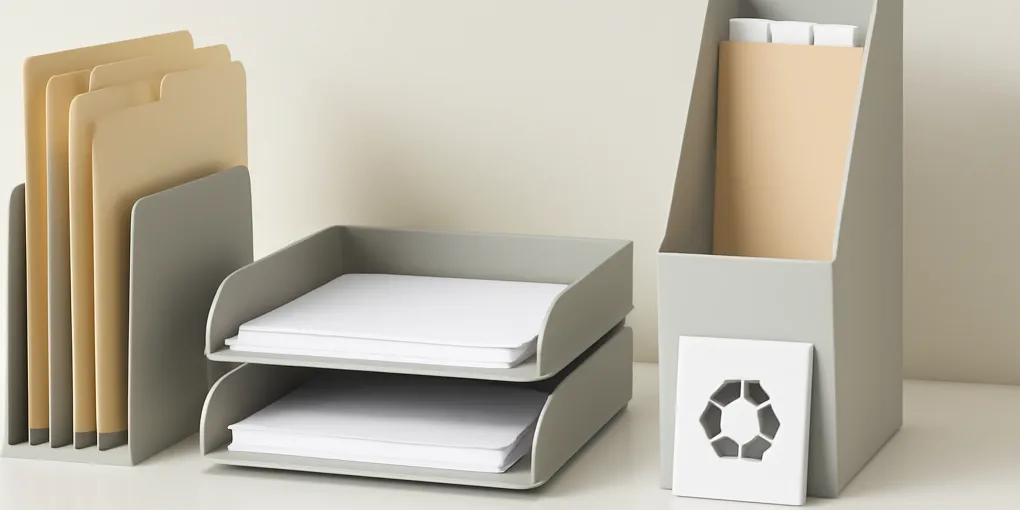
Best Countertop Paper Sorters for Mail, School Forms, Receipts, and To-Do Piles
Buyer's GuideFTC disclosure: This article contains affiliate links. If you buy through Amazon links, ClutterScience may earn a commission at no extra cost to you.
How We Score Countertop Paper Sorters
ClutterScience uses a five-factor composite methodology for organization recommendations: Research 30%, Evidence Quality 25%, Value 20%, User Signals 15%, Transparency 10%.
| Factor | Weight | What It Measures |
|---|---|---|
| Research | 30% | Fit with attention, decision friction, habit cues, and household workflow principles |
| Evidence Quality | 25% | Consistency with paper management, safety, and product documentation |
| Value | 20% | Usefulness relative to cost, footprint, durability, and reset time |
| User Signals | 15% | Common failure points such as hidden papers, tipping, over-sorting, and counter sprawl |
| Transparency | 10% | Clear tradeoffs, limitations, and when a cheaper option is enough |
A paper sorter is not a filing cabinet. It is a short-term decision tool. The best one helps you answer, “What needs action, what can leave, and what belongs somewhere else?”
Useful product searches include vertical mail sorter for counter, wood desktop file sorter, stackable letter trays, and magazine file holders for papers. These are Amazon search links because no direct ASINs were verified during drafting.
Why Countertop Paper Gets Out of Control
Paper piles are hard because paper is rarely just paper. One envelope may require payment. Another may need shredding. A school form may need a signature. A receipt may be needed for a return. A coupon may not matter at all, but you do not want to decide while making dinner.
The kitchen counter becomes a holding zone because it is visible and central. That visibility is useful for urgent forms, but dangerous for long-term storage. A good countertop paper sorter keeps decisions visible while preventing the counter from becoming a mixed stack.
The best system has few categories and a scheduled reset. If you buy a sorter but never decide what each slot means, it becomes a vertical pile.
Best Overall: Three-to-Five Slot Vertical Sorter
A vertical sorter is the best starting point for most households. Papers stand upright, labels remain visible, and categories are easier to scan than stacked trays. Choose a sorter with three to five slots and enough weight that it will not tip when one slot is full.
Use categories based on action:
- Pay or reply.
- Sign and return.
- File or scan.
- Coupons or short-term reference.
- Someone else’s papers.
Do not create a slot called “miscellaneous.” Miscellaneous is where systems go to die. If a paper does not fit, decide whether the category is missing or the paper should leave the counter.
Best for: mail, school forms, medical forms, household notices, and short-term action papers.
Limitations: not ideal for thick folders, notebooks, or long-term archives. Move completed papers to a filing system weekly.
Best for Active Projects: Stackable Letter Trays
Letter trays work well when papers move through stages: inbox, in progress, waiting, done. They are common in offices because they support workflow. At home, they are best for recurring admin work, homeschooling, household projects, or a kitchen desk.
Choose trays with open fronts and enough vertical clearance to grab papers without lifting the stack. Two or three trays are usually enough. More trays may look organized but create too many categories for daily use.
Best for: project papers, forms that need multiple steps, weekly admin sessions, and temporary inbox/outbox systems.
Limitations: horizontal stacks hide the bottom papers. If the household tends to forget hidden items, use vertical sorting instead.
Best for Small Counters: Wall-Mounted Mail Organizer
If the counter is small, move paper upward. A wall-mounted mail organizer near the entryway or kitchen door keeps the drop zone visible without taking prep space. Look for shallow pockets and a small key shelf only if keys are part of the same routine.
Wall-mounted systems work best when the paper volume is low. If the household receives a lot of school, medical, business, or legal paperwork, a tiny wall pocket will overflow quickly. Use it only for the next action, not the archive.
Best for: apartments, narrow entryways, small kitchens, and households where paper enters at the door.
Limitations: installation is required for sturdy models. Adhesive models can fail under heavy paper loads.
Best Budget Option: Magazine Files
Magazine files are inexpensive, upright, and easy to label. They are not as elegant as dedicated mail sorters, but they work well for broad categories: school, bills, receipts, reference, and outgoing.
Use separate files rather than one giant file. A single magazine file full of mixed papers is just a hidden stack. Label the front and keep the files shallow enough that papers do not disappear for months.
Best for: low-cost setups, renters, temporary command centers, and households testing categories before buying a nicer sorter.
Limitations: paper can slump inside wide files. Use folders or envelopes inside the file if categories need separation.
Best Add-On: Small Recycle and Shred Cue
A paper sorter works better when the exit path is obvious. Place a small recycle bin, paper bag, or visual cue near the sorting area. For sensitive documents, keep a locked shred envelope or a labeled “to shred” folder.
This matters because junk mail should not be sorted. It should leave immediately. If recycling is across the house, junk mail will wait on the counter. If the shredder is inconvenient, sensitive papers will hover in a pile.
Best for: preventing paper accumulation before it enters the sorter.
Limitations: do not put a full-size shredder on the counter unless it is truly used daily. A bulky machine can become the clutter you were trying to remove.
How to Set Up Categories That Work
Start with three categories: action, waiting, and file. After one week, adjust. If action is too broad, split it into pay/reply and sign/return. If file fills quickly, your filing system is too far away or your weekly reset is missing.
Write category labels as verbs when possible. “Pay” is clearer than “bills.” “Return” is clearer than “receipts.” “Sign” is clearer than “school.” Verbs reduce decision friction because they tell you what to do next.
Reset the sorter once a week. Ten minutes is enough if the categories are clear. Move completed papers to file, recycle expired paper, handle quick actions, and put unresolved papers back in the correct slot.
What Not to Buy
Avoid huge desk organizers with too many drawers unless you already have a strong paperwork habit. Drawers hide paper and add a retrieval step. Avoid decorative baskets for action paper. They look calm but make documents harder to scan. Avoid tiny sorters if your real paper volume is high; overflow will teach the household to ignore the system.
Also avoid buying a sorter before deciding where paper enters the home. If mail comes through the garage door but the organizer sits in a home office, the counter pile will continue.
Countertop Paper Sorter Setup by Household Type
A single adult or couple can usually run a very lean setup: one vertical sorter, one recycle cue, and one weekly reset. The labels can be simple: action, waiting, file. The main risk in this household type is letting the sorter become a permanent archive because there is no one else forcing a deadline. Put a recurring reminder on the same day each week to empty it.
Families with school-age children usually need one person-based or child-based category. This does not mean every child needs a full paper management system on the counter. It means school forms, permission slips, artwork to review, and activity notices need a place that is not mixed with bills. If a child brings home daily papers, add a short after-school paper routine: recycle what is not needed, sign what is due, photograph what is sentimental but not worth storing, and move keepers out of the counter sorter.
Remote workers need a stronger boundary between household paper and work paper. If work documents land in the kitchen sorter, household bills and work deadlines compete for attention. Use a separate work inbox, even if it is just a single letter tray near the desk. The counter sorter should remain for household administration.
Caregivers often need a medical or appointment category. Use a labeled slot for appointment paperwork, medication instructions, insurance notices, and forms that need calls. Keep sensitive documents turned inward or in a folder if privacy matters. The sorter can cue the task, but long-term medical records should move to a more secure file.
The Weekly Reset Script
A paper sorter is only as good as its reset. Use the same script every week so the decision burden stays low:
- Pull every paper out of the sorter.
- Recycle obvious junk first.
- Put urgent actions in a small stack and handle any two-minute tasks immediately.
- Move completed papers to file, scan, or shred.
- Return only still-active papers to the sorter.
- Check whether any category overflowed and rename labels if needed.
The reset should feel like clearing a runway, not doing a full paperwork marathon. If it regularly takes more than twenty minutes, the sorter is receiving papers that should bypass it. Coupons, old receipts, manuals, and sentimental paper usually need separate rules.
Design Details That Matter More Than Style
Weight matters. A lightweight sorter can tip when tall envelopes or folders lean to one side. Slot width matters because narrow slots crumple envelopes and wide slots invite overfilling. Visibility matters because hidden paper is easy to forget. Cleaning matters too: kitchen counters collect crumbs and moisture, so avoid fabric sorters next to food prep zones.
Choose material based on location. Metal mesh is durable and visible, but small papers can snag. Wood looks warmer and may be heavier, but it can stain in kitchens. Acrylic is easy to wipe and visually light, but scratches may show. Cardboard magazine files are cheap and flexible, but they are not ideal near sinks or cooking splatter.
Finally, leave breathing room around the organizer. If the sorter is wedged behind appliances or decor, it will not be used. The system needs enough clearance for one-handed drop-off and quick scanning.
Sources and Further Reading
This buyer’s guide combines household workflow design with consumer safety and administrative guidance. The Federal Trade Commission’s identity theft resources explain why some paper should be shredded rather than casually recycled. The IRS guidance on recordkeeping is useful for documents that may need longer retention. EPA guidance on reducing waste supports sorting junk mail and duplicate paper out of the system quickly.
Bottom Line
For most homes, the best countertop paper sorter is a three-to-five slot vertical organizer with action-based labels. Add a recycle or shred cue nearby, reset weekly, and keep archives somewhere else. The goal is not to store paper on the counter. It is to make today’s decisions visible before they become next month’s pile.
Frequently Asked Questions
- A vertical sorter with three to five clearly visible slots is best for most homes because it separates action categories without hiding papers in a stack.
- Letter trays are better for active projects and inbox/outbox workflows. Vertical sorters are usually better for household mail and forms because categories stay visible.
- Use three to five categories. More than that turns sorting into filing, which is too much friction for a countertop system.
- Only if paper already enters through the kitchen and the sorter is reset weekly. Otherwise, move the sorter closer to the entryway or home office.