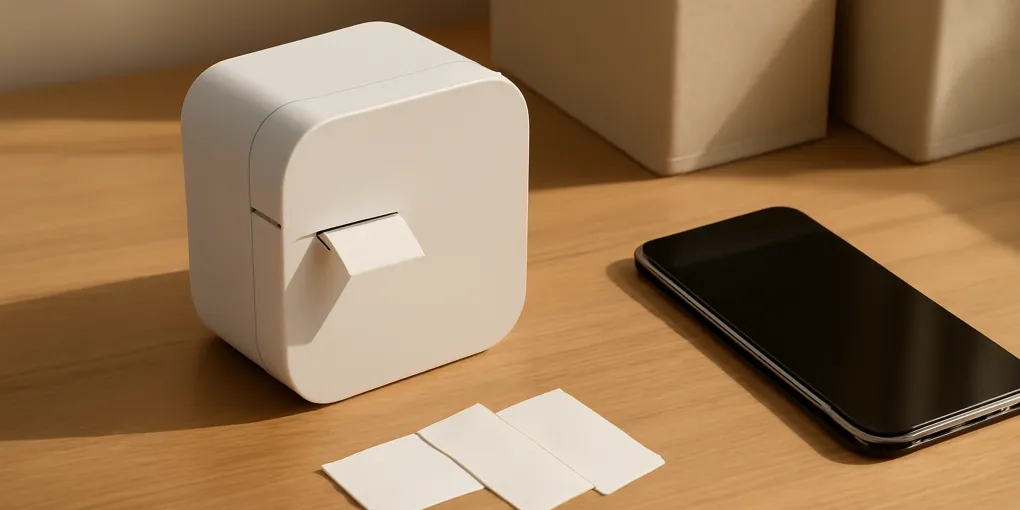
Brother P-touch CUBE Plus PT-P710BT
Best for repeatable typed labelsBest For: Home inventories, cable IDs, shelf bins, and files that need consistent typed labels
Quick picks
| Product | Key Specs |
|---|---|
| See price on Amazon |
|
| See price on Amazon |
|
Product availability, certifications, and retailer details can change; check the current Amazon page before buying.
The Brother P-touch CUBE Plus PT-P710BT is a compact label printer without a built-in keyboard. You type and design on a phone, tablet, or computer, then send the job to the printer. That trade is the entire buying decision: the CUBE Plus gives you easier editing and repeatable layouts, but a standalone label maker is faster when you only need one simple label and do not want to open an app.
For home organization, the PT-P710BT is strongest when labels carry real retrieval information: box number, room, cable owner, filter part number, shelf category, or review date. It is excessive for labeling clear bins whose contents are already obvious.
Verified specifications that matter
Brother’s official product page lists Bluetooth and USB connectivity, a rechargeable lithium-ion battery, automatic cutting, and compatibility with TZe tapes up to 24 mm wide (Brother PT-P710BT product page). Brother also provides the model manual and software through its support portal (PT-P710BT support).
| Feature | What it changes at home |
|---|---|
| Phone and computer editing | Easier long names, duplicate labels, symbols, and saved templates |
| Up to 24 mm tape | Wide enough for readable bin and shelf labels, but not shipping-label territory |
| Automatic cutter | Cleaner repeated batches with less manual trimming |
| Rechargeable battery | Can move between office, garage, and pantry without disposable batteries |
| TZe tape system | Durable options and many widths, with an ongoing proprietary cassette cost |
| No built-in keyboard | Printer is dependent on another device for every new job |
Check Brother P-touch CUBE Plus PT-P710BT on Amazon. Use the model number in the search because “P-touch Cube” can return different generations.
Where the CUBE Plus earns its space
Numbered storage inventories
For opaque archive boxes, print a short identifier such as G-04 or PHOTO-02, then keep the detailed contents in a spreadsheet or note. The physical label remains readable while the editable list carries item-level detail. Do not print the entire box inventory in tiny type.
Cable and adapter ownership
Use narrow tape as a flag near one end of a cable. Include device or room, not vague categories such as “charger.” A useful label says guest room lamp or router power. Avoid wrapping tape over ventilation holes, electrical ratings, or damaged insulation.
Maintenance parts
A label on a clean storage bin can record Vacuum filter, model V11 or HVAC 16x25x1. Put the replacement date on the maintenance card rather than creating layers of crossed-out tape on equipment.
Shared household files
Typed labels improve scanning when several people use the same files. The benefit is consistency, not decoration. Six stable categories beat thirty narrow folders created because the printer makes them look tidy.
Tape selection is the hidden cost
The printer does not use ink, but every label consumes TZe tape and can leave margin waste depending on layout and cutting settings. Compare cassettes by width, length, adhesive type, surface, and environment.
| Surface or job | Better tape choice | Avoid |
|---|---|---|
| Smooth plastic bin | Standard laminated TZe tape after cleaning the surface | Applying over dust or textured weave |
| Cable flag | Flexible-ID tape if specified for the job | Tight wrap that hides ratings or bends the cable |
| Freezer or cold area | Tape rated by Brother for the temperature and surface | Assuming every decorative tape survives condensation |
| Paper file tab | Narrow standard tape or ordinary paper label | Wide premium tape that overhangs the tab |
| Fabric bin | A hanging tag or label holder | Expecting adhesive tape to bond to fuzzy fabric |
Before ordering a multipack, buy one cassette in the width and color combination you will actually use. Check Brother TZe tape 12mm 24mm on Amazon, then check the cassette code against Brother’s PT-P710BT compatibility information.
App-first workflow: strength and friction
The phone interface makes long text, duplicate quantities, and layout preview easier than a tiny physical keyboard. A batch of twelve numbered moving or archive boxes is where the CUBE Plus feels efficient: create one format, change the identifier, and print consistently.
The same workflow is slower for a single spontaneous label. You must have the device, connectivity, supported app, and enough printer charge. If household members will refuse that sequence, the printer may become one person’s tool rather than a shared system.
Computer connectivity is valuable for planned batches and saved templates. It also reduces the temptation to design every label on a small phone screen. Install software only from Brother or the official mobile app store, and review permissions rather than granting broad photo or contact access that the job does not need.
CUBE Plus versus a standalone label maker
| Buyer | CUBE Plus PT-P710BT | Standalone PT-D210-style model |
|---|---|---|
| Prints repeated inventory IDs | Strong | Adequate but slower to edit in batches |
| Wants no phone dependency | Poor fit | Strong fit |
| Needs desktop templates | Strong | Limited |
| Labels in several rooms | Rechargeable and portable | Portable, but check battery or adapter setup |
| Multiple household users | Good only if everyone will use the app | Easier for quick walk-up labels |
| Wants the lowest ongoing complexity | More software and pairing | More direct keyboard workflow |
The Brother P-touch PT-D210 is the clearer alternative for a buyer who values immediate typing over template flexibility. Check Brother P-touch PT-D210 on Amazon. Confirm current included accessories because bundles differ.
Where TZe labels fail: clear bins, fabric, and changing contents
The PT-P710BT does not make every container a good adhesive surface. A clear bin of one visible item needs no 24 mm label. Woven fabric can release a standard TZe strip, while a hanging tag or label holder remains readable. A toy-rotation bin that changes weekly is better served by a removable card than repeated laminated tape.
The printer also cannot keep stale text truthful. If contents change, replace the strip immediately. Do not cover an old TZe label with a new one until the previous adhesive and residue are removed, because raised edges make the replacement easier to catch and peel.
Use a printed label only where one of these is true:
- Contents are hidden.
- Similar items are easy to confuse.
- A model, owner, date, or location matters.
- Several people must return an item consistently.
- The container participates in a separate inventory.
Verdict
Buy the Brother P-touch CUBE Plus if you expect repeated typed labels, want phone and computer editing, and accept TZe cassette costs. It is particularly good for numbered home inventories, maintenance-part bins, shared files, and cable identification.
Skip it if you print only a few simple labels each month, dislike app-dependent appliances, or mainly use fabric baskets and frequently changing open bins. A marker, paper insert, or standalone keyboard model will be faster and cheaper for those jobs.
Sources
- Brother USA, P-touch CUBE Plus PT-P710BT product specifications: https://www.brother-usa.com/products/ptp710bt
- Brother Solutions Center, PT-P710BT manuals, downloads, and compatibility: https://support.brother.com/g/b/producttop.aspx?c=us&lang=en&prod=p710bteus
Frequently Asked Questions
- No ink cartridge is used. The PT-P710BT prints on Brother TZe thermal-transfer tape cassettes, so ongoing cost comes from replacement tape.
- Yes. Brother specifies USB computer connectivity as well as Bluetooth use with supported mobile software.
- Brother lists TZe tape widths up to 24 mm for the PT-P710BT. Confirm the current cassette compatibility before ordering refills.