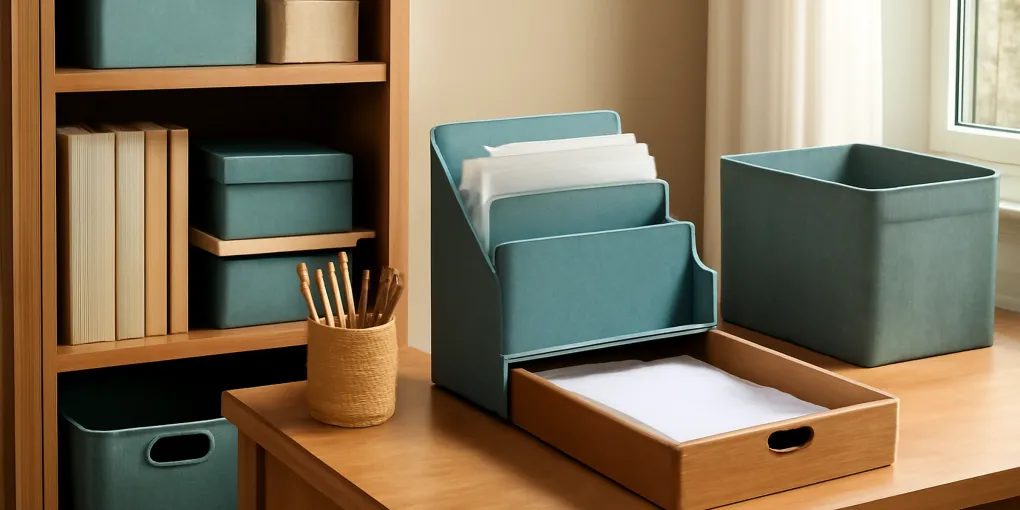
Paper clutter is rarely a paper problem at first. It is usually an undecided-next-action problem. Mail, school forms, receipts, medical paperwork, warranties, coupons, and tax documents pile up because each item asks a slightly different question. Keep? Scan? Pay? Sign? Shred? File? Return? A paper inbox protocol gives those questions a place to wait without taking over the kitchen counter.
Recommended products
Search for View desktop paper tray on Amazon, View vertical mail sorter on Amazon, or View home file box on Amazon. Compare current labels, prices, sellers, dimensions, and return policies before buying.
Overall rating: 4.4 out of 5 for households where paper piles appear on counters even though storage bins already exist.
Best for: mail-heavy homes, caregivers, freelancers, families with school forms, and anyone who postpones paper decisions.
Not best for: people who need legal, tax, or medical retention advice beyond general organizing; consult qualified professionals for regulated records.
The Protocol in One Sentence
Every incoming paper gets one temporary home, one next-action label, and one scheduled decision window. The system works because it separates capture from processing. You do not need to decide every item at the door. You do need to prevent the item from spreading across multiple surfaces.
Choose One Physical Inbox
Use one tray, one vertical sorter, or one wall pocket as the official paper inbox. It should be near the place where paper enters the home, not hidden in an office no one visits. If mail lands on the kitchen island, the inbox belongs within a few steps of that island. If school forms land near backpacks, put the inbox near the backpack station.
The inbox must be easy to drop into but not so large that it can hold months of paper. A deep basket feels forgiving at first, then becomes a paper cave. A shallow tray creates a visible limit. Visibility is useful because it tells you when the decision debt is growing.
Use Four Next-Action Categories
Do not create twenty paper categories. Start with four:
- Pay or schedule.
- Sign or return.
- Scan or file.
- Shred or recycle.
These categories are verbs, not topics. A bill and a school fee form may both belong in pay or schedule. A medical receipt and a warranty may both belong in scan or file. Verb labels reduce ambiguity because they tell you what must happen next.
The Ten-Minute Processing Window
Pick two weekly processing windows, such as Tuesday evening and Saturday morning. Set a ten-minute timer. Empty the inbox into the four action categories. Complete any two-minute actions immediately. Put longer actions on a task list with a date. Shred obvious discards. Return the inbox to empty or near empty.
This time-box matters. Paper clutter becomes aversive when every paper session feels endless. A short, repeated session lowers the activation energy. If ten minutes is not enough, that is data. Either the household receives too much paper, the categories are unclear, or delayed tasks need a separate workflow.
What to Scan and What to Keep
Use conservative judgment. Some documents may need original copies. Tax, legal, medical, insurance, immigration, property, and employment records can have specific retention requirements. This article is not legal or financial advice. For uncertain documents, keep the original until a qualified source tells you otherwise.
For everyday household paper, scanning can reduce volume if filenames are clear and backups are reliable. A bad digital filing system is just invisible clutter. Use dates, vendor or institution names, and a short description. Example: 2026-05-14-insurance-card-renewal. Avoid vague names like scan1 or important.
G6 Clutter Science Score
| Factor | Weight | Score | Why it matters |
|---|---|---|---|
| Research fit | 30% | 8.4 | The recommendation is grounded in attention, friction, and household-behavior research rather than decoration alone. |
| Evidence quality | 25% | 8.0 | The evidence supports principles such as reduced visual load and easier resets, while product-specific claims remain conservative. |
| Value | 20% | 8.2 | The approach favors low-cost measurement, reusing existing containers when possible, and buying only after a failure point is clear. |
| User signals | 15% | 7.8 | The best signals are repeated daily use, fewer misplaced items, and a weekly reset that takes minutes rather than an hour. |
| Transparency | 10% | 9.0 | Shopping-result links are labeled clearly, not presented as product-identifier endorsements, and limitations are stated. |
Composite G6 score: 8.2 out of 10. A score above 8 means the system is likely to help a real household if the fit checks are completed before buying.
Product Fit: Tray, Sorter, or File Box?
A flat tray is best for quick capture and high visibility. It is also the easiest to overfill if you skip processing windows. A vertical sorter is better when several action categories need to be visible at once. It can fail if slots are too narrow or labels are unclear. A portable file box is best for documents that have already been processed and need retention. It is not ideal as the first landing place because closed boxes hide decision debt.
For most homes, the sequence is tray first, sorter second, file box third. Capture, decide, retain. Buying the file box first often creates a prettier pile without solving the decision process.
Red Flags
The system needs redesign if:
- Paper appears in more than three rooms.
- The inbox is full before the next processing window.
- The shred pile is avoided because the shredder is inconvenient.
- Receipts are kept without a reason.
- Important forms are mixed with coupons.
- Household members do not know where incoming paper goes.
Each red flag points to friction. Move the shredder, shrink the inbox, clarify the labels, or create a separate school-form station. Do not assume the household needs more storage.
Maintenance Script
At the start of each processing window, say the action out loud or write it on a sticky note: capture, decide, dispatch. Capture all loose paper into the inbox. Decide the next action. Dispatch the paper to bill pay, signature, scan, shred, recycle, or file. The script sounds simple because it is supposed to be simple. Complex paper systems are rarely maintained.
Evidence Notes and Sources
This article uses organization research as a decision aid, not as medical advice. Useful background includes:
- Chae and Zhu, 2014, “Environmental Disorder Leads to Self-Regulatory Failure” in Journal of Consumer Research: https://doi.org/10.1086/674547
- McMains and Kastner, 2011, “Interactions of Top-Down and Bottom-Up Mechanisms in Human Visual Cortex” in Journal of Neuroscience: https://doi.org/10.1523/JNEUROSCI.3766-10.2011
- Saxbe and Repetti, 2010, “No Place Like Home” in Personality and Social Psychology Bulletin: https://doi.org/10.1177/0146167210386563
- U.S. Consumer Product Safety Commission safety education: https://www.cpsc.gov/Safety-Education
The practical recommendation is to reduce decision friction, make return paths visible, and avoid products that create hidden maintenance work.
Related Clutter Science Guide
For a product-specific comparison, see our guide to vertical file sorters for mail.
Fit Test Before You Buy
Run a seven-day fit test before ordering the main organizer. Put a temporary container, hook, tray, or tape outline where the product would go. Use it exactly as the final system would be used. If the household ignores the temporary version, a more expensive version is unlikely to fix the behavior. If the temporary version works but looks messy, then a better product may be justified.
The fit test should answer three questions. First, is the location close enough to the moment of use? Second, is the return action obvious when someone is tired or carrying other items? Third, does the container create a visible limit before it becomes a hidden backlog? These questions matter more than the product finish.
Common Failure Modes
The first failure mode is overcapacity. When a container is too large, it attracts unrelated objects and becomes a mixed-storage zone. The second failure mode is undercapacity. When a container is too small, overflow appears immediately and the system feels broken. The third failure mode is hidden maintenance. Any solution with lids, drawers, deep bins, or stacked access asks for extra steps. That can be acceptable for rare-use items, but it is risky for daily clutter.
The fourth failure mode is buying for a fantasy routine. If the current habit is drop-and-go, choose an open landing place before choosing closed cabinetry. If the current habit is delayed decision-making, choose a review schedule before choosing archival storage. Products work best when they remove friction from an existing behavior rather than demanding a new personality.
Household Rules That Keep It Working
A durable system needs a limit, an owner, and a reset moment. The limit defines how much the zone can hold. The owner decides what happens when the zone is full. The reset moment is the recurring time when stray items are returned, donated, recycled, washed, or relocated. Without those three pieces, even good organizers drift into storage for undecided objects.
Use plain rules. One category per bin. Daily items at easy reach. Heavy items low. Wet or dirty items separated. Review anything that has not moved in a season. If a rule cannot be explained in one sentence, it probably will not survive a busy week.
FAQ
Should I declutter before buying Paper Inbox Protocol?
Usually no. Remove obvious trash, donations, duplicates, and wrong-room items first. Then measure what remains. Buying first can lock you into the wrong capacity.
How long should I test a Paper Inbox Protocol setup?
Test for at least one normal week. A weekend reset can make almost anything look successful for a day. A week shows whether the system survives workdays, errands, laundry, guests, or family routines.
What shows a Paper Inbox Protocol system is failing?
The clearest sign is repeated overflow in the same place. Overflow is not a character flaw; it is feedback that the zone is too small, too far away, too hidden, or assigned to the wrong category.
Two-Week Review
After two weeks, review the system with evidence instead of preference. Count how many items are in the correct zone, how many are adjacent to the zone, and how many have escaped to a different room. Correct-zone items show the system is working. Adjacent items suggest the location is close but the return action may be slightly too hard. Escaped items suggest the category belongs somewhere else or the household has not agreed on the rule.
Use that review to make one change at a time. Move the container, change the label, reduce the capacity, or split one broad category into two simpler categories. Avoid changing everything at once because you will not know which adjustment helped. The goal is a boring system that survives normal life.
Bottom Line
A paper inbox protocol works when it converts vague piles into scheduled decisions. Use one visible inbox, four verb-based categories, and short recurring processing windows. Buy trays and sorters only to support that protocol, not to postpone the decisions the protocol is designed to surface.