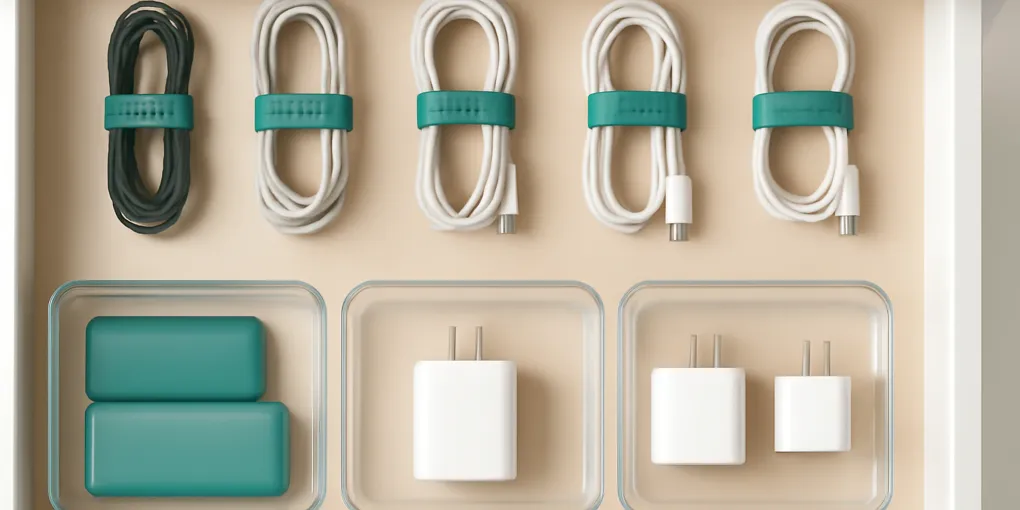
Best Cord Organizers for a Shared Charging Drawer
Buyer's GuideThe best cord organizer for a shared charging drawer is a system, not one gadget: reusable ties for individual cables, shallow bins for connector categories, and clear labels so nobody has to dump the drawer to find one cable.
Editorial Transparency
ClutterScience uses AI tools during drafting support, outline organization, and source review. Human editors review every article for accuracy, clarity, product-link policy, and source quality. We do not fabricate reviewers, credentials, test results, ASINs, or citations.
Quick Picks
| Organizer | Best for | Avoid when | Search link |
|---|---|---|---|
| Reusable hook-and-loop cable ties | Everyday cords | You need a rigid label surface | reusable cable tiesAffiliate link: we may earn a commission. This does not affect scoring. |
| Silicone cable straps | Travel chargers and family devices | Very thick cords | silicone cable strapsAffiliate link: we may earn a commission. This does not affect scoring. |
| Clear shallow drawer bins | Sorting USB-C, Lightning, HDMI, and adapters | Deep drawers with tall bricks | clear shallow drawer binsAffiliate link: we may earn a commission. This does not affect scoring. |
| Label maker tape | Shared households | Temporary categories that change weekly | label maker tapeAffiliate link: we may earn a commission. This does not affect scoring. |
| Cable management box | Power strip on a desk or shelf | Closed, hot, overloaded spaces | cable management boxAffiliate link: we may earn a commission. This does not affect scoring. |
We use search links rather than direct ASIN links because cable sizes, multipacks, colors, and sellers change often. Match the organizer to your cable length and drawer size before buying.
Start With Safety
Do not turn a closed drawer into a heat-trapping charging cabinet unless it is specifically designed for that use. Power adapters generate heat, and damaged cords can be a fire risk. The Electrical Safety Foundation International recommends replacing damaged electrical cords and avoiding overloaded outlets or extension cords.
A safe charging drawer usually stores inactive cables and adapters. Active charging should happen on an open surface, a ventilated charging station, or a manufacturer-approved setup.
The Three-Zone Charging Drawer
A shared charging drawer works best with three zones:
- Daily cables: the cords people use every week.
- Backup cables: extras that are still current but not daily.
- Specialty adapters: camera cords, HDMI adapters, legacy connectors, and travel plugs.
If every cable is treated as daily, the drawer becomes a knot. If every cable is hidden as backup, people buy duplicates.
Reusable Hook-and-Loop Ties
Hook-and-loop ties are the best first purchase because they solve the biggest problem: loose cables tangle. They are adjustable, inexpensive, and easy for kids or guests to understand.
Use one tie per cable. Do not bundle unrelated cables together. Bundling by category seems efficient until someone needs one cord and pulls apart the whole group.
Silicone Straps
Silicone straps are useful for travel chargers and cables that move between a bag and drawer. They feel more durable than paper labels and are easier to spot in a backpack.
Choose brighter colors if several people share similar chargers. Color can be a low-friction ownership cue: blue for work laptop, green for tablet, orange for travel.
Clear Drawer Bins
Clear bins turn a drawer into a simple map. Use broad categories: USB-C, Lightning, laptop, audio/video, adapters. Avoid categories so narrow that nobody maintains them.
If the drawer is shallow, measure the height of the tallest adapter before buying bins. A beautiful bin that stops the drawer from closing is not an organizer.
Labels That People Will Actually Use
Labels help when more than one person uses the drawer. They reduce the tiny argument of where a cable belongs. Use connector names people recognize, not technical perfection.
Good labels:
- USB-C.
- iPhone / Lightning.
- Laptop.
- Camera.
- Travel.
- Mystery: test by Friday.
That last label matters. A temporary mystery bin prevents questionable cords from contaminating the useful categories.
What to Remove
Remove frayed cords, obsolete chargers for devices you no longer own, duplicate low-quality cables, and mystery adapters that fail the testing deadline. Do not donate damaged electrical items.
For rechargeable devices and loose batteries, follow local recycling guidance. The U.S. Environmental Protection Agency notes that different battery chemistries have different disposal and recycling recommendations.
How This Buyer’s Guide Is Scored
Composite score breakdown: Research 30%, Evidence Quality 25%, Value 20%, User Signals 15%, Transparency 10%. Research weighs safety guidance and household-use fit. Evidence Quality favors institutionally credible electrical and recycling sources. Value rewards low-cost tools that reduce duplicate buying. User Signals weighs shared-household retrieval and reset friction. Transparency covers active-charging heat limits, product-instruction differences, and changing connector standards. Safety is also treated as a hard gate because cable storage can create heat, trip, or damage risks if handled poorly. Retrieval speed is 20% and favors visible categories. Reset ease is 20% and rewards ties and bins people can maintain quickly. Flexibility is 20% and considers changing connector standards. Transparency is 10% and covers the limit that active charging setups must follow product instructions and household electrical conditions.
Setup Plan for a Real Shared Drawer
Start by dumping the drawer onto a towel and separating active chargers from archive cables. Active chargers are the cords someone used in the last month. Archive cables are still useful but not part of daily life. Obsolete cables are for devices you no longer own or cannot identify after a short test. That first sort is more important than the container because it prevents the drawer from becoming a museum of old connector standards.
Next, test the obvious mystery cords. If a cable does not charge reliably, remove it. A neat drawer full of weak or intermittent cables creates duplicate buying because people stop trusting the drawer. For shared homes, reliability matters more than quantity. Two known-good USB-C cables are more useful than eight unknown cords tangled in the back.
After testing, assign each category a visible lane. The front lane should hold daily cables. The middle lane can hold backup cables. The back lane can hold specialty adapters. Put travel chargers in a small removable pouch so they can leave the drawer as a group. This keeps vacation packing from destroying the main system.
Label by Behavior, Not by Perfect Technical Terms
The technically correct label is not always the best household label. A USB-C cable may charge a laptop, tablet, phone, and headphones, but if the family calls it the laptop cable, label one bin “laptop” and another “USB-C spares.” The goal is retrieval, not a standards manual.
For households with teenagers, guests, or caregivers, add a tiny “return here” label inside each bin. That sounds excessive until you realize most cable clutter happens after the cable is used, not before. The system must explain itself when the person is tired and trying to put something away quickly.
When a Charging Drawer Is the Wrong System
A drawer is not ideal if people need to charge devices in several rooms. In that case, create small charging homes near the actual use points: one nightstand cable, one desk cable, one kitchen cable, and one travel pouch. Centralizing every cord can make the drawer look clean while increasing daily friction.
A drawer is also wrong for bulky power bricks that generate heat during active use. Store the brick there when inactive, but do not close a hot adapter inside a packed drawer. If you want hidden charging, buy a product specifically designed for charging and follow its ventilation instructions.
Maintenance Routine
Review the drawer every three months or whenever a new device enters the house. Remove packaging, duplicate weak cables, and obsolete adapters. Update labels when connector standards change. If the mystery bin is still full after the review date, recycle or responsibly discard what cannot be identified.
The best sign that the system works is not that the drawer looks perfect. It is that nobody has to ask where the charger is.
Buying and Setup Mistakes to Avoid
The most common mistake is buying a product before defining the behavior it needs to support. Containers do not create habits by themselves. They make a chosen habit easier or harder. Before buying, write one sentence that explains what the item must do: hold outgoing returns by the door, separate cables by connector, divide small drawer tools, or cue mail processing. If the product does not support that sentence, skip it.
The second mistake is filling every available inch. Empty space is part of the system because it gives your hands room to reset the area quickly. A container that is 100% full on day one is already failing. Aim for about 70% full so new items can enter briefly without destroying the layout.
The third mistake is hiding active tasks too well. Closed bins, opaque boxes, and deep drawers can make a space look calmer while making the next action less visible. Use closed storage for completed categories and visible, bounded storage for tasks that still need action.
Finally, do not judge the setup by the first hour. Judge it after two normal weeks. A good system survives groceries, tired evenings, rushed mornings, and other people using it. If the system fails, adjust distance, label clarity, or category size before buying a larger version of the same problem.
Two-Week Review Questions
After two weeks, review the setup with five questions. Did the pile or tangle shrink? Can someone else understand the categories? Is the next action visible without searching? Are the containers easy to reset when tired? Did the system create a new pile nearby?
If the answer is mostly yes, keep the system and schedule a light monthly reset. If the answer is no, remove one layer of complexity. Most home systems improve when categories become broader, containers become easier to reach, and labels describe actions rather than ideals.
Simple Low-Buy Version
If you are not ready to buy anything, test the system with supplies you already own. Use a shoebox lid, a spare basket, painter’s tape labels, or clean food containers for two weeks. A temporary version reveals the right size and location before money is spent. If the temporary version works, upgrade only the weakest part. If it does not work, the problem is probably placement or category design rather than product quality.
For the charging drawer specifically, the low-buy test is simple: tie each cable with a reusable twist tie, sort by connector into labeled temporary cups, and remove every cable that fails a quick charging test. If that alone fixes the drawer, you may only need better labels and a few durable ties.
Sources
- Electrical Safety Foundation International. “Extension Cord Safety Tips.” https://www.esfi.org/extension-cord-safety-tips/
- U.S. Environmental Protection Agency. “Used Household Batteries.” https://www.epa.gov/recycle/used-household-batteries
Bottom Line
For a shared charging drawer, buy reusable cable ties first, add shallow clear bins second, and label by connector type. Store inactive cords in the drawer, but keep active charging ventilated and safe.
Frequently Asked Questions
- Use short reusable ties for individual cables, shallow bins for cable types, and labels for connector type. Keep actively charging devices out of closed drawers unless the setup is designed for heat and ventilation.
- They can be useful for hiding power strips, but they should not be overloaded or used where heat cannot dissipate. Follow the product instructions and avoid covering damaged cords or adapters.
- No. Keep daily cables in the charging drawer and move backups, obsolete cords, and specialty adapters to labeled overflow storage.