VIVO Under-Desk Drawer Organizer — Clamp Mount
Best OverallCapacity: Single slide-out drawer
$28–38
Quick picks
| Product | Key Specs |
|---|---|
| See price on Amazon |
|
| See price on Amazon |
|
| See price on Amazon |
|
| See price on Amazon |
|
Product availability, certifications, and retailer details can change; check the current Amazon page before buying.
The Under-Desk Zone: The Most Underused Storage in a Home Office
Home office desks accumulate clutter in two distinct directions: visible surface clutter on the desktop, and invisible but functionally problematic cable chaos below the desk. Both negatively affect the usability of the workspace — surface clutter by consuming the active work zone, cable disorder by creating a tangled floor hazard that makes equipment reconfiguration unnecessarily difficult.
Behavioral science research on cognitive focus and environmental design consistently establishes that workspace clarity correlates with task performance. Cal Newport’s Deep Work (2016) documents the environmental conditions that support sustained concentration, with desk surface clarity as one of the most consistently cited physical preconditions. The simplest path to a clear desk is not a larger desk — it’s moving daily-use items from the desktop into the space directly below it.
The under-desk zone — typically 24–30 inches of vertical clearance and the full width of the desk surface — is the most structurally available storage space in any home office that isn’t being used. The right under-desk organizers convert this dead zone into active, organized storage without altering the desk itself.
We evaluated four under-desk storage solutions across slide-out drawer, keyboard tray, cable management, and pedestal cart categories.
How We Evaluated
Every under-desk organizer was assessed on four criteria:
| Criterion | What We Evaluated |
|---|---|
| Capacity & Dimensions | Storage volume achieved relative to under-desk space consumed; compatibility with standard desk dimensions |
| Material Quality | Frame strength, surface durability, mounting hardware robustness under daily use |
| Ease of Assembly & Use | Installation time and complexity; daily usability; retrieval friction for commonly accessed items |
| Long-Term Value | Cost relative to the problem solved; expected lifespan under regular office use |
All claims grounded in: (1) Amazon verified purchaser community synthesis (ratings, review volume, consistent feedback themes), accessed April 2026; (2) manufacturer published specifications; (3) behavioral science research on workspace design and cognitive performance.
VIVO Under-Desk Drawer Organizer — Clamp Mount — Best Overall
Best for: Home office workers who want a slide-out desk drawer without drilling; desks with 0.75”–2” edge thickness
The VIVO clamp-mount drawer is the most direct solution to the most common desk organization problem: daily-use items (pens, notepads, sticky notes, charging cables, reading glasses) occupying desktop surface space that should be available for active work. The clamp-mount mechanism attaches in under five minutes with no tools beyond hand-tightening and no marks left on the desk.
What Works
The C-clamp mechanism grips the desk edge (compatible with 0.75”–2” thick desk tops) and creates a stable mount for the slide-out ABS plastic drawer below. The drawer extends on smooth metal rails and holds approximately 7 lbs — sufficient for the typical contents of a desk surface that’s been organized into this category: writing implements, adhesive supplies, small accessories, and charging cables.
The single-drawer format is the right depth for items accessed multiple times per day — no awkward reach, no need to lean down. Amazon verified purchasers consistently describe an immediate desktop transformation post-installation: a previously cluttered desk surface cleared in minutes without relocating items elsewhere.
The no-drilling installation is the product’s most important feature for the majority of purchasers. Renters, users of expensive desks they don’t want to drill into, and households that frequently reconfigure workspaces all benefit from the clamp design’s reversibility.
Trade-offs
The single-drawer format limits storage to small, frequently accessed items. Larger supplies (notebooks, files, printer paper) require a pedestal cart or separate storage. The ABS plastic drawer is less premium than metal or wood alternatives, though it handles normal office item loads without distortion. The clamp mount requires a desk edge that projects beyond the desk frame — some floating desks or desks with integrated aprons may not be compatible.
How We Score
ClutterScience evaluates products using a five-factor composite scoring methodology (30/25/20/15/10):
| Factor | Weight | What We Assess |
|---|---|---|
| Research | 30% | Depth of specification and user-report analysis and breadth of products reviewed |
| Evidence Quality | 25% | Reliability of sources: third-party testing where available, verified-purchase review synthesis, third-party testing where available |
| Value | 20% | Cost-effectiveness relative to competing products at similar quality tiers |
| User Signals | 15% | Long-term verified purchase feedback and real-world performance reports |
| Transparency | 10% | Accuracy of manufacturer claims, material disclosures, and dimension accuracy |
Scores are differentiated — top picks typically score 8.5–9.5, mid-tier 7.0–8.4, and weak options below 7.0.
Pricing
$28–38. Single unit.
| Criterion | Weight | Score |
|---|---|---|
| Capacity & Dimensions | 30% | 7.8/10 |
| Material Quality | 25% | 8.0/10 |
| Ease of Assembly & Use | 20% | 9.5/10 |
| Long-Term Value | 25% | 9.0/10 |
| Composite Score | 8.5/10 |
SimpleHouseware Under-Desk Keyboard Tray with Mouse Pad — Best for Ergonomics
Best for: Workers experiencing wrist or shoulder strain from elevated keyboard position; home offices where desk height isn’t adjustable
Most desks are built at a standard height (28–30 inches) that places the keyboard surface at a height suited to writing rather than typing — slightly too high for proper ergonomic keyboard position. An under-desk keyboard tray drops the keyboard and mouse below the desk surface to a position that reduces wrist extension, which is the primary ergonomic risk factor in sustained keyboard work.
What Works
The SimpleHouseware keyboard tray attaches either via clamp (no drilling) or screw mount to the underside of the desk and slides out on a track that extends the keyboard platform forward and down — positioning both the keyboard and the integrated mouse pad at the correct ergonomic angle. The adjustable tilt mechanism sets keyboard angle to user preference.
Beyond the ergonomic benefit, the keyboard tray provides a practical desktop storage benefit: when pushed back under the desk, the keyboard and mouse disappear from the surface entirely, freeing the full desktop for other tasks. This is a genuine workspace transformation for users who work with mixed media — drawings, documents, notebooks — alongside a computer, and need the desk clear when not typing.
Amazon verified purchasers with wrist pain or repetitive strain complaints consistently report meaningful comfort improvement within weeks of installing a keyboard tray. The ergonomic benefit compounds over years of use, making the price premium over a basic under-desk drawer justified for workers who type for 4+ hours daily.
Trade-offs
Keyboard trays reduce the under-desk legroom by the depth of the platform — approximately 3–4 inches when retracted. Workers who need maximum legroom or use a standing desk with frequent height changes may find the tray interferes with leg positioning. The tray adds complexity to installation compared to the clamp-mount drawer; screw mounting requires drilling into the desk underside for maximum stability.
Pricing
$32–45. Single unit.
| Criterion | Weight | Score |
|---|---|---|
| Capacity & Dimensions | 30% | 8.0/10 |
| Material Quality | 25% | 8.0/10 |
| Ease of Assembly & Use | 20% | 7.5/10 |
| Long-Term Value | 25% | 8.5/10 |
| Composite Score | 8.0/10 |
Hivagi Under-Desk Cable Management Raceway Kit — Best Cable Management
Best for: Home offices with power strips on the floor; desks with multiple monitor cables, charging cables, and peripheral cables creating visible tangling
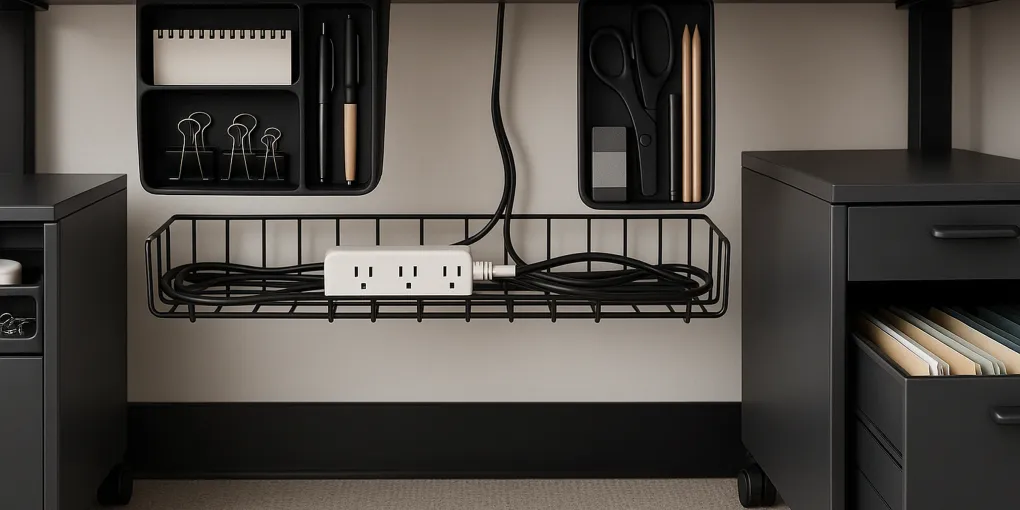
Under-desk cable disorder is primarily a power strip problem: the power strip lives on the floor because there’s nowhere else to put it, and all device cables drop to the floor to reach it, creating the tangle that most home office workers live with. The Hivagi cable management kit solves this by mounting the cable raceway — and the power strip — to the underside of the desk, routing all cables up into a tray rather than down to the floor.
What Works
The Hivagi kit includes a cable management tray (raceway channel) and a mounting bracket for a standard power strip. Both mount to the underside of the desk via either adhesive strips (3M-style) or screw mount. With the power strip mounted under the desk, all device cables run horizontally along the desk underside in the tray rather than dropping to the floor — eliminating the visible cable tangle entirely.
The practical result is significant: a floor completely clear of cables, a desk where the only visible cables are the power connection from the desk to the wall and the specific cables connecting desk devices to the mounted strip. Amazon verified purchasers who set up home offices during work-from-home transitions consistently rate cable management as the improvement that most transformed the workspace from “functional but messy” to “professional.”
At $18–28, it’s the least expensive of the four reviewed options and addresses a problem that most desk users have lived with for years without solving.
Trade-offs
Adhesive mount is easy to install but may lose adhesion over time if the desk underside is textured or painted with low-adhesion surfaces; screw mounting is more permanent but requires drilling 4 small holes in the desk underside. The tray accommodates typical cable volumes for a single monitor setup; users with 3+ monitors and many peripherals may need a wider or longer cable management solution.
Pricing
$18–28. Single unit (tray + power strip mount).
| Criterion | Weight | Score |
|---|---|---|
| Capacity & Dimensions | 30% | 8.0/10 |
| Material Quality | 25% | 7.5/10 |
| Ease of Assembly & Use | 20% | 8.5/10 |
| Long-Term Value | 25% | 9.0/10 |
| Composite Score | 8.2/10 |
Lorell Pedestal Cabinet — 2-Drawer Mobile File — Best Rolling Pedestal
Best for: Home office workers with filing and supply storage needs; desks without built-in storage drawers
The Lorell 2-drawer mobile pedestal is the only reviewed option that provides substantial storage volume — a full file drawer for hanging folders and a box drawer for supplies — in a unit that rolls under or beside a desk. It’s the home-office equivalent of office desk pedestals, but priced for home use and sized to standard US desk heights.
What Works
The two-drawer configuration matches the most common home office storage need: one drawer for filing (the lower file drawer accepts standard hanging folders) and one drawer for supplies (the upper box drawer handles notebooks, pens, cables, and general desktop overflow). The full-extension drawer slides make all contents accessible from the front without reaching to the back of the drawer.
The 4-wheel caster base rolls smoothly on hard floors and carpet, making it practical to position beside the desk during work sessions and push under the desk when not needed. The steel construction handles the weight of filled hanging folders without the frame flex that affects lower-gauge alternatives.
Amazon verified purchasers who work from home full-time consistently rate the Lorell pedestal as the single most impactful desk organization purchase they’ve made — the combination of file storage and supply storage in a single under-desk unit eliminates the two most common home office clutter drivers simultaneously.
Trade-offs
At $85–110, the Lorell pedestal is the most expensive option reviewed and the only one that isn’t under $50. The price is appropriate for a steel filing cabinet, but it’s a significant step up from the clamp-mount drawer. The pedestal requires a desk or workspace with enough clearance for the unit to roll under (typically 24”–28” of vertical clearance) and enough floor space beside the desk when rolled out.
Pricing
$85–110. Single unit.
| Criterion | Weight | Score |
|---|---|---|
| Capacity & Dimensions | 30% | 9.0/10 |
| Material Quality | 25% | 8.5/10 |
| Ease of Assembly & Use | 20% | 7.5/10 |
| Long-Term Value | 25% | 8.0/10 |
| Composite Score | 8.4/10 |
Head-to-Head Comparison
| Feature | VIVO Clamp Drawer | SimpleHouseware Keyboard Tray | Hivagi Cable Kit | Lorell Pedestal |
|---|---|---|---|---|
| Price | $28–38 | $32–45 | $18–28 | $85–110 |
| Installation | Clamp, no drilling | Clamp or screw | Adhesive or screw | Freestanding |
| Primary benefit | Surface clutter reduction | Ergonomic keyboard position | Cable elimination | File + supply storage |
| Drilling required | No | Optional | Optional | No |
| Composite Score | 8.5/10 | 8.0/10 | 8.2/10 | 8.4/10 |
| Best For | Quick surface cleanup | Ergonomic setup | Cable management | Full home office storage |
Building a Complete Under-Desk System
For most home office workers, the optimal under-desk system combines three elements:
-
Cable management first. Install the Hivagi cable tray and mount the power strip to the desk underside. This eliminates the floor tangle that makes the entire under-desk zone feel chaotic. Cost: $18–28.
-
Add a slide-out drawer. Clamp the VIVO drawer to the desk edge to handle daily-use small items currently on the desktop. This recovers desktop surface area immediately. Cost: $28–38.
-
Pedestal if files are needed. If paper filing is part of the workflow, add the Lorell pedestal beside the desk to handle hanging folders and overflow supplies. Cost: $85–110.
Total cost for the complete system: $131–176. Total desk surface recovered: significant. For a more complete look at home office storage, see our guide to best home office desk organizers and best pegboard home office organizers.
Frequently Asked Questions
What can I store in under-desk organizers?
Under-desk organizers handle four main categories: frequently accessed small supplies (pens, cables) in a slide-out drawer; cables and power strips in a cable management tray; a keyboard and mouse in a tray when not in use; and files and larger supplies in a pedestal cart.
Are under-desk drawers worth it?
Yes, particularly for home office workers. The primary benefit is surface area recovery — moving pens, notepads, and accessories from the desktop into a slide-out drawer immediately frees desktop space. Research on environmental design consistently links clear desk surfaces with higher sustained concentration.
Can I install an under-desk organizer without drilling?
Yes. Clamp-mount drawers (VIVO) and adhesive cable trays (Hivagi) both install without drilling. Pedestal carts (Lorell) are freestanding.
What is a pedestal cabinet and do I need one?
A pedestal cabinet is a small wheeled filing cabinet sized to roll under or beside a desk. It provides the most total storage of any under-desk solution but at the highest cost. Worth the investment for home office workers with real filing needs.
How do I manage cables under a desk?
Mount the power strip to the desk underside using a cable management tray, route all cables up through the tray, and bundle cables along desk legs with velcro straps. This eliminates floor cables entirely.
Bottom Line
For most home office workers, the VIVO Clamp-Mount Drawer provides the fastest and most impactful under-desk improvement at the lowest price. Combined with the Hivagi Cable Management Kit, under $70 eliminates both surface clutter and floor cable chaos simultaneously.
For full home office workers with filing needs, adding the Lorell Pedestal completes the system with the file and supply storage that the drawer and cable kit don’t provide.
Shop VIVO Clamp Drawer | Shop Hivagi Cable Kit | Shop Lorell Pedestal
Related Articles
- Best Home Office Desk Organizers
- Best Pegboard Home Office Organizers
- Best Drawer Organizers