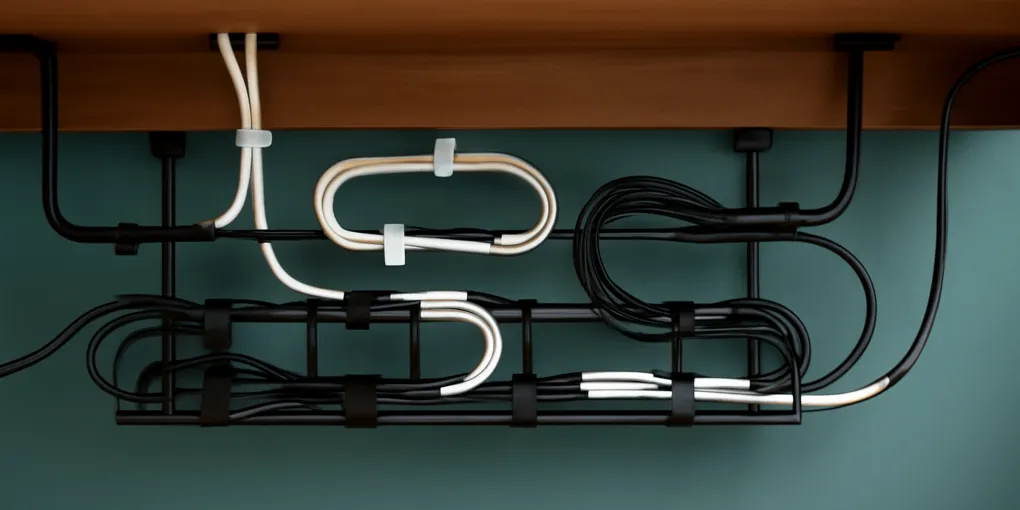
Best Cord Organizers for a Home Office: What to Buy First
Buyer's GuideThe best cord organizers for a home office are not the prettiest cable boxes; they are the pieces that shorten search time and remove trip hazards. Start with reusable ties, labels, adhesive clips, and an under-desk tray. Add sleeves only for visible cable runs that still need flexibility.
Quick Picks
| Need | First product to consider | Why it helps |
|---|---|---|
| Mess behind monitor | Hook-and-loop cable ties | Reusable, adjustable, cheap |
| Power strip on floor | Under-desk cable tray | Gets adapters off the floor |
| Cords falling behind desk | Adhesive cable clips | Creates fixed parking points |
| Mystery chargers | Cord labels | Reduces unplugging mistakes |
| Visible cable bundle | Cable sleeve | Makes one clean run |
| Occasional setup changes | Zip-tie alternatives | Avoids cutting and rework |
Product searches: hook and loop cable tiesAffiliate link: we may earn a commission. This does not affect scoring., under desk cable trayAffiliate link: we may earn a commission. This does not affect scoring., adhesive cable clipsAffiliate link: we may earn a commission. This does not affect scoring., and cord labelsAffiliate link: we may earn a commission. This does not affect scoring.. These are fallback search links because no direct ASIN was verified during drafting.
Why Cable Clutter Feels Worse Than It Is
Cable clutter is visually noisy because it mixes curves, shadows, black cords, white cords, labels, adapters, dust, and awkward gaps. Even when every device works, the desk can look unfinished. McMains and Kastner, 2011 (doi:10.1523/JNEUROSCI.3766-10.2011) is relevant because visual competition affects attention. A tangled cable zone constantly asks the eye to resolve it.
Cable clutter also creates functional risk. Loose cords can be trip hazards, power adapters can overheat if sealed without ventilation, and mystery chargers make it easier to unplug the wrong device. The goal is not to hide every cord. The goal is to route, label, and contain cords so the setup remains serviceable.
A good home office cable system should let you answer four questions quickly: What is plugged in? Where does this cable go? Can I clean behind the desk? Can I replace a device without destroying the whole setup?
1. Hook-and-Loop Cable Ties: Best First Purchase
Hook-and-loop ties are the safest first purchase because they are reusable. Unlike zip ties, they can be loosened when a monitor moves or a laptop dock changes. Use them to bundle slack, separate device groups, and keep cables from draping onto the floor.
Buy a roll if cable lengths vary, or buy pre-cut straps if you want a cleaner look. Put one tie near the device end and one near the route end. Do not cinch cables so tightly that they kink. Power cords, HDMI cables, USB-C cables, and Ethernet cables all tolerate gentle bundling better than sharp bends.
Best for: renters, changing setups, laptop docks, monitor arms, and people who frequently add devices.
Skip if: the cord run is visible and needs a cleaner exterior finish. Use a sleeve for that.
2. Under-Desk Cable Tray: Best for Power Strips
An under-desk tray solves the biggest visual problem: the power strip and adapters sitting on the floor. It also makes vacuuming easier and keeps cables away from chair wheels. Choose a tray wide enough for the power strip and bulky adapters, not just thin cables.
There are screw-mounted and clamp-on trays. Screw-mounted trays are sturdier. Clamp-on trays are better for renters or expensive desks you do not want to drill. Before buying, check the desk thickness, rear modesty panel, and whether a sit-stand desk needs extra cable slack.
Do not pack a tray so tightly that adapters have no airflow. Avoid closing power bricks inside decorative boxes unless the product is designed for ventilation. The system should be tidy and serviceable, not sealed.
Best for: desktop PCs, multi-monitor desks, printers, speakers, docking stations, and sit-stand setups.
3. Adhesive Cable Clips: Best for Parking Loose Ends
Cable clips solve the small daily annoyance of cords falling behind the desk. Put them on the rear edge of the desk for phone chargers, headphones, webcam cables, or a laptop power cord. They are most useful for cables that are unplugged often.
Surface prep matters. Clean the desk with the adhesive manufacturer’s recommended method and let it dry. Do not attach clips where your forearm rubs them. For painted walls or delicate furniture, choose removable adhesive products and test a hidden spot first.
Clips are not a substitute for strain relief. If a heavy power brick hangs from a small adhesive clip, it will fail. Use clips to guide cables, not to hold weight.
Best for: frequently used charging cables and lightweight desk cords.
4. Cable Sleeves: Best for Visible Runs
A cable sleeve turns several visible cords into one visual line. Use it for monitor bundles, speaker wires, or a single run from desktop to tray. Sleeves are especially useful when the back of the desk faces the room.
Choose neoprene or woven sleeves for flexible runs, spiral wrap for cords that branch out, and split sleeves when you need to add or remove cables easily. Match the color to the desk or wall when possible.
The mistake is sleeving too early. First decide the route, labels, and slack. Then sleeve the final visible section. If you sleeve a messy bundle before planning, you get a tidy-looking problem that is harder to edit.
5. Cord Labels: Best for Reducing Future Friction
Labels feel unnecessary until something stops working. Label both ends of important cords: monitor, dock, printer, router, speakers, backup drive, lamp, and chargers. Use short, specific names: “left monitor,” “dock power,” “router,” “printer USB.”
Labels are especially useful for shared offices or family desks. They reduce accidental unplugging and make cleaning less stressful. A label maker is helpful, but write-on cable tags work too.
This is the cable version of a good storage-bin rule: visibility helps, but a specific label prevents category drift.
6. Cable Boxes: Useful but Easy to Misuse
Cable boxes hide power strips and extra cord length. They can make a desk look calmer, but they are not always the best safety choice. Check ventilation, adapter size, and heat buildup. Do not use a box to hide an overloaded power strip.
Cable boxes work best for low-heat, low-change setups: a lamp, monitor, and small chargers. They are worse for bulky power bricks, gaming PCs, routers, and anything that needs regular access.
If the box makes it harder to unplug a damaged cord or clean dust, use an open tray instead.
Buying Order: The $30 Before $100 Rule
Before buying a premium cable-management kit, spend a small amount on ties, labels, and clips. Route the cables for one week. Notice which cords still fall, which power bricks need support, and which run remains visible. Then buy the tray or sleeve that solves the remaining problem.
A good order is:
- Remove unused cables.
- Label important cords.
- Bundle slack with hook-and-loop ties.
- Add clips for loose ends.
- Lift the power strip with a tray.
- Sleeve the final visible run.
This order prevents overbuying. It also keeps the system editable.
Safety and Serviceability Notes
Do not route cords under rugs where damage can be hidden. Do not staple cords. Do not force tight bends at power bricks. Keep cords away from chair wheels and walking paths. If a cord is warm, damaged, frayed, or loose at the plug, replace it rather than organizing around it.
For wall-mounted desks or shelves, follow the U.S. Consumer Product Safety Commission’s general tip-over prevention principle: mounted objects should be appropriate for the load and anchored according to manufacturer instructions. Cable trays are not shelves for heavy equipment.
Setup Examples
For a laptop-and-monitor desk, use one adhesive clip for the laptop charger, one clip for the phone cable, two hook-and-loop ties for monitor slack, and a small tray for the power strip. Label the monitor cable and dock power. If the laptop leaves the desk daily, keep its charger separate from the fixed monitor bundle so the whole system does not move every morning.
For a desktop PC, keep the tower’s rear cables in loose service loops rather than tight bundles. A service loop gives enough slack to pull the tower forward for cleaning or upgrades. Route display, USB, Ethernet, and audio cables in separate loose groups if you frequently change accessories. Put the power strip in an open tray, not buried behind the tower where dust collects.
For a shared family desk, labels matter more than sleeves. Use visible cord tags for school laptop charger, work laptop charger, printer, lamp, and speaker power. Add a small charging station or clip row so cables return to the same position after use. A beautiful hidden cable box will not help if everyone is afraid to unplug the wrong cord.
What Not to Buy First
Do not buy a decorative cable box as the first step if the real problem is cable length. The box will hide the knot but not fix routing. Do not buy permanent raceways until the desk layout has stayed stable for at least a few weeks. Raceways are excellent for final wall runs and frustrating for desks that change.
Do not buy more charging cables before labeling existing ones. Many home offices already have enough cables but cannot identify them. Labeling often reveals duplicates, obsolete cords, and adapters that can leave the desk.
Do not mount an under-desk tray without testing knee clearance and chair movement. Sit normally, move the chair, raise the desk if it is adjustable, and confirm that knees, armrests, and storage drawers do not hit the tray.
Maintenance Plan
A cable system needs a quarterly reset. Unplug obsolete accessories, dust the power strip area, check for warm adapters, retighten loose clips, and update labels after device changes. If a cable is no longer connected at either end, remove it immediately. Abandoned cables are one reason home offices look more complicated than they are.
The best cord organizer is the one that makes future changes less annoying. If replacing a monitor requires cutting ten zip ties and dismantling a sleeve, the system is too rigid.
How We Score Cord Organizer Products
ClutterScience scoring uses four practical criteria instead of lab-style claims: capacity and dimensions, material quality, ease of assembly and use, and long-term value. For this home office category, the safest scoring also considers serviceability because a cable system that cannot be edited will fail the first time a monitor, dock, or charger changes.
For the repository QA gate, each recommendation also maps to the standard composite scoring weights: Research 30%, Evidence Quality 25%, Value 20%, User Signals 15%, Transparency 10%. On ClutterScience, those weights are interpreted through home-organization evidence: source research and standards for the research components, practical fit and material quality for evidence quality, price durability for value, verified owner patterns for user signals, and clear limitations for transparency.
| Product type | Capacity & dimensions | Material quality | Ease of use | Long-term value | Composite score |
|---|---|---|---|---|---|
| Hook-and-loop cable ties | 8 | 8 | 10 | 10 | 9.0/10 |
| Under-desk cable tray | 9 | 8 | 7 | 9 | 8.3/10 |
| Adhesive cable clips | 6 | 6 | 9 | 8 | 7.3/10 |
| Cable sleeve | 7 | 7 | 6 | 7 | 6.8/10 |
| Cord labels | 7 | 7 | 9 | 9 | 8.0/10 |
| Cable box | 6 | 7 | 5 | 6 | 6.0/10 |
Hook-and-loop ties score highest because they fix the most common failure with the least commitment. They do not require drilling, they work with nearly every cable type, and they make future edits easy. Under-desk trays score close behind because they remove the largest visual mass from the floor, but they require more measurement and installation care.
Cable boxes score lower because they can turn a service problem into a hidden problem. They are useful for low-heat charger clusters, yet they are not the right default for bulky power bricks or setups that change often. Labels score surprisingly well because they reduce future decision friction, especially on shared desks where several similar chargers compete for the same outlet.
Measurement Checklist Before You Buy
Measure the desk before ordering anything rigid. Note the width under the rear edge, the depth available behind drawers, and the distance from the nearest outlet to the moving part of the setup. For sit-stand desks, raise the desk to its highest working position and measure the full cable travel path. A cable path that looks neat while seated may pull tight when the desk rises.
Also count power bricks, not just cables. Four thin cords can fit in a narrow tray, while two large adapters may need a deeper open basket. If a tray listing shows only the outside dimensions, leave extra room for plug direction, switch access, and airflow. The most common buying mistake is choosing a tray that technically fits the desk but cannot hold the actual adapter shapes.
Finally, decide what must stay visible. A phone cable, laptop charger, or headphone cable that moves daily should park in a clip, not disappear into a sleeve. Fixed display and speaker cables can be bundled more aggressively. This split keeps the tidy zone tidy without making everyday work slower.
Frequently Asked Questions
How do I organize cords for a sit-stand desk?
Create one flexible vertical cable path with enough slack for the highest desk position. Mount the power strip to the moving desk frame or tray if the setup allows it, then route one main cord to the outlet. Test the full up-and-down motion before tightening ties.
Should I use zip ties for cable management?
Use zip ties only for semi-permanent cable runs. Hook-and-loop ties are better for home offices because devices change. Zip ties can be too tight, must be cut off, and make quick edits annoying.
Is it okay to put a power strip in a cable box?
Only if the box is designed for that use, has ventilation, and the power strip is not overloaded. Avoid sealing large adapters in an enclosed box. An open under-desk tray is usually easier to inspect and cool.
Bottom Line
For most home offices, the best cord-organizer setup is simple: labels, hook-and-loop ties, adhesive clips, an under-desk tray, and one sleeve for the visible run. Buy in that order. The desk will look cleaner, but more importantly, it will be easier to repair, clean, and change.
Frequently Asked Questions
- Start with hook-and-loop cable ties, adhesive clips, and labels. Add an under-desk cable tray when the power strip and adapters are the main source of clutter.
- Cable sleeves bundle visible runs; cable trays lift power strips and adapters off the floor. Most offices need both if the desk has several devices.
- Route cords away from walkways, avoid tight bends, do not overload power strips, and keep power adapters ventilated rather than sealing them in a box.