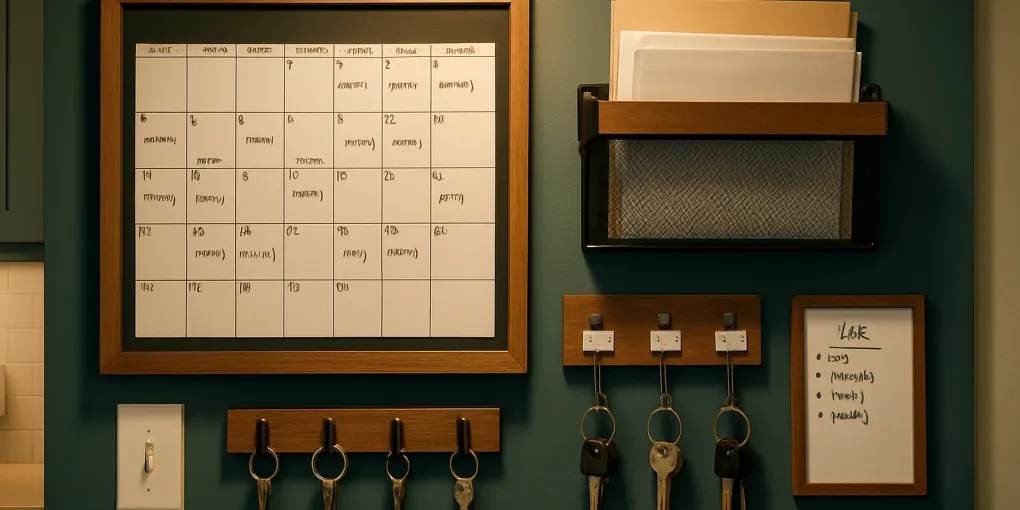
How to Create a Home Command Center (Step-by-Step Guide)
ProtocolHow to Create a Home Command Center
A home command center is a centralized wall station that consolidates the household’s organizational tools — calendar, mail, keys, to-do notes, charging — in one predictable location. It solves the household coordination failures that scatter these functions across multiple imprecise locations: the key that’s “somewhere on the counter,” the appointment card that “was on the fridge,” the permission slip that appeared the morning it was due.
The principle is simple: a command center works because it creates a single source of truth for household information and a single landing zone for household items. It works best when placed in a high-traffic transition zone and built with friction-free components that require minimal effort to use consistently.
This guide walks through the six-step process for building a command center that household members will actually use — from choosing the right location to the specific tools for each function.
How We Score
ClutterScience evaluates home organization guides and protocols using a five-factor composite methodology (30/25/20/15/10):
| Factor | Weight | What We Assess |
|---|---|---|
| Research | 30% | Evidence quality grounding the protocol recommendations (behavioral science, habit formation research) |
| Evidence Quality | 25% | Reliability and relevance of cited sources to real household use cases |
| Value | 20% | Practical cost-effectiveness of the recommended products and approach |
| User Signals | 15% | Consistency with real-world user outcomes from verified community reports |
| Transparency | 10% | Honest acknowledgment of where results depend on household-specific factors |
Step 1: Choose the Right Location
The location determines whether the command center works long-term. A command center that is not passed consistently by all household members will not be used consistently by all household members.
The best locations, ranked:
| Location | Pros | Cons |
|---|---|---|
| Entryway / front door wall | Passed every time anyone leaves or enters | May lack wall space; limited lighting in some entryways |
| Kitchen (entry-side wall) | Most trafficked room; natural family coordination zone | Kitchen wall space is often occupied by cabinets |
| Mudroom | Purpose-built transition space; full wall access | Not all homes have a dedicated mudroom |
| Hallway | Wide availability | Works only if the hallway is actually a daily route |
Location selection criteria:
- Every household member passes it at least once per day
- At least 24–36 inches of clear wall width (48+ inches preferred for full systems)
- Adequate lighting (natural or overhead) — cannot read a calendar in a dark corner
- Within arm’s reach of the main entry — the key hook must be reachable from the door without backtracking
Mark the chosen location with painter’s tape before purchasing anything. Verify that all household members pass the taped zone daily for one week before committing.
Step 2: Define Your Household’s Core Functions
A command center that attempts to solve too many problems becomes visually chaotic and difficult to maintain. Start by identifying the three to five organizational failures your household experiences most often.
Common household coordination failures and their command center solutions:
| Failure | Command Center Solution |
|---|---|
| Keys misplaced | Wall hook system fixed beside the door |
| Missed appointments | Large wall calendar visible at a glance |
| Incoming mail piling up | Wall-mounted paper inbox with action/file division |
| Reminders forgotten | Whiteboard or notepad section |
| Phones and devices dying | Charging station with fixed device spots |
| Permission slips, bills, school forms lost | Labeled paper sorting baskets |
| Grocery and task lists scattered | Magnetic notepad or clip section |
Minimum viable command center (what actually gets used):
- Calendar — the non-negotiable anchor of every effective command center
- Key hooks — the second highest-ROI component
- Paper inbox — for mail and action items
- Communication surface — whiteboard or notepad
Add charging and additional sorting as a second phase after the core three are established and in regular use.
Step 3: Select the Right Tools
Component selection determines the aesthetic and usability of the system. Use these criteria:
Calendar
The family calendar is the most important component. Requirements:
- Wall-mounted, not a desk or phone calendar — visibility from across the room is the functional goal
- Large enough to see at a glance — minimum 17 x 22 inches; 24 x 36 preferred for multi-person households
- Erasable or replaceable monthly — a dry-erase wall calendar allows real-time updates without reprinting
Recommended: View Large Dry-Erase Wall Calendar on Amazon — undated format allows perpetual use, mounted with removable Command strips.
Key Hooks
Key hooks must be beside the door at the height where keys are naturally held when entering — typically 54–60 inches from the floor (average arm height). A hook that requires looking down or moving sideways will not be used consistently.
Recommended: View Command Large Picture Hanging Strips Hooks on Amazon — damage-free installation with adhesive mounting; each hook holds a household member’s labeled key ring.
For multi-key households, a horizontal row of labeled hooks (one per person, clearly named) produces the most reliable daily use. Label each hook with the person’s name — a generic “keys” hook produces confusion in multi-person households.
Paper Inbox and Sorting
A wall-mounted mail organizer provides a vertical paper inbox that doesn’t require counter space. Look for units with at minimum two compartments: Action (items requiring a response, signature, or decision) and File (items to be filed but not immediately urgent).
Recommended: View mDesign Metal Wall Mount Mail Organizer on Amazon — 2-pocket design, mounts flush to wall, wipes clean, fits standard envelopes and folded papers.
One maintenance rule: the inbox must be cleared weekly. A paper inbox that is never emptied becomes a paper accumulation zone. Set a weekly Sunday evening habit of sorting the inbox — action items addressed, filing items moved to the home filing location.
Whiteboard or Notepad
A small whiteboard (12 x 16 inches minimum) or a pad of weekly planning sheets provides the communication surface for reminders, grocery additions, and short-term notes. Magnetic whiteboards allow paper and notes to be clipped with magnets — a useful additional surface.
Recommended: View U Brands Magnetic Dry-Erase Board on Amazon — mounts flush, accepts magnets for document attachment, wipes cleanly.
Charging Station (Optional — Phase 2)
A wall-mounted or surface-mounted charging dock with labeled device spots allows phones and tablets to charge in a fixed location with the same behavioral benefit as key hooks: a fixed location for a high-frequency household item.
Recommended: View Satechi Charging Station Dock on Amazon or a View wall-mounted power strip with USB ports on Amazon mounted at the command center location.
Step 4: Plan the Layout
The layout determines which components are seen first and get used most. Use this spatial hierarchy:
┌─────────────────────────────────────────────┐
│                                             │
│          WALL CALENDAR (center/top)         │
│         [large, visible from across room]   │
│                                             │
├────────────────┬────────────────────────────┤
│ KEY HOOKS      │   PAPER INBOX              │
│ [at arm height]│   [Action | File]          │
│                │                            │
├────────────────┴────────────────────────────┤
│  WHITEBOARD / NOTEPAD                       │
│  [reminders, grocery list]                  │
│                                             │
│  [CHARGING STATION — optional, below]       │
└─────────────────────────────────────────────┘
Layout principles:
- Calendar at the top — must be visible from the greatest distance
- Keys at the entry-side edge — must be reachable immediately when entering
- Paper inbox beside the calendar — mail is reviewed at the same moment as the calendar
- Whiteboard below — referenced while standing; doesn’t need to be visible from across the room
- Charging station at the lowest position or on a nearby shelf — not a visual priority
Allow 2–3 inches of visual spacing between components to prevent the wall from reading as cluttered.
Step 5: Install and Label
Installation tools:
- Command strips (damage-free; recommended for rental spaces or for experimenting with placement)
- Level or laser level app on a phone
- Pencil for marking positions before drilling
- Painter’s tape to mock-up the layout on the wall before committing
Installation sequence:
- Tape up the component footprints with painter’s tape to preview the full layout at scale
- Live with the preview for 24 hours — verify sightlines and arm-height positions
- Install the calendar first (the anchor component)
- Install key hooks at exactly arm height from the floor (measure from the tallest regular user’s shoulder)
- Install the paper inbox to the calendar’s right (or left, based on available wall space)
- Install whiteboard below
Labeling: Label each key hook with the name of the household member. Label paper inbox sections (“Action / This Week” and “File / Hold”). Label the whiteboard area with a default purpose (“Shopping List” or “This Week’s Reminders”) to prevent the surface from becoming a general scribble zone.
For a clean aesthetic: use a label maker (recommended: View DYMO LabelManager on Amazon) to create consistent lettering rather than handwritten labels.
Step 6: Build the Daily Habit
The physical command center is infrastructure. The habit is the operating layer that makes the infrastructure functional.
Behavioral science research on habit formation (Wood & Neal, 2007) identifies three components of a reliable habit: a cue, a routine, and a reward. The command center’s strength is that it can be cued by existing daily behaviors rather than requiring new behavior creation.
Morning cue sequence (cue: first coffee):
- While waiting for coffee: glance at the calendar for today’s events and deadlines
- Scan the whiteboard for active reminders
- Check the paper inbox for anything that arrived yesterday
Evening cue sequence (cue: entering the house):
- Keys land on the hook as the first physical action on entry
- Any incoming mail goes directly into the paper inbox (not a temporary counter location)
- Any items needed tomorrow are noted on the whiteboard before the end of the evening
Weekly maintenance habit (cue: Sunday evening):
- Clear and sort the paper inbox — action items addressed or scheduled; file items moved to the filing location
- Update the calendar with any new events from the past week
- Erase outdated whiteboard reminders
These three habits — morning review, evening landing, weekly reset — are the behavioral infrastructure that converts the command center from a wall decoration into a functional organizational system.
Recommended Products Summary
| Recommended Product | Component | Approx. Cost |
|---|---|---|
| View Large Dry-Erase Wall Calendar (undated) on Amazon | Calendar | $12–25 |
| View Command adhesive key hooks (set) on Amazon | Key hooks | $8–15 |
| View mDesign Metal Wall Mount Mail Organizer on Amazon | Paper inbox | $15–25 |
| View U Brands Magnetic Dry-Erase Board on Amazon | Whiteboard | $10–18 |
| View DYMO LabelManager on Amazon | Label maker | $20–35 |
| View Multi-device charging station with USB on Amazon | Charging station | $20–40 |
Minimum viable system cost: ~$45–65 (calendar + key hooks + paper inbox) Full system cost: ~$80–160 (all six components)
Common Command Center Mistakes
Choosing the wrong location. The most common failure. If the command center is not in the direct daily path of all household members, it will not be used. Test the location with painter’s tape for a week before installing.
Too many components at launch. Adding 8 components simultaneously creates visual overwhelm and maintenance burden. Start with three (calendar, key hooks, paper inbox) and add components only after the core habit is established.
No weekly reset habit. A command center without a weekly inbox clearing becomes a paper accumulation point within two weeks. The weekly reset is not optional — build it into Sunday evening as a 10-minute fixed habit.
Generic hooks for keys. A single “key” hook in a household of four produces key-sorting disputes and missed hooks. One labeled hook per person, at arm height, eliminates the ambiguity.
The aesthetic-first trap. Command centers become ineffective when chosen for Pinterest aesthetics rather than function — baskets too small to hold real mail, calendars too decorative to actually write on, hooks at the wrong height. Design should serve function; the test is daily use, not how it photographs.
Frequently Asked Questions
What is a home command center?
A home command center is a designated wall station — typically in the entryway, mudroom, or kitchen — that centralizes a household’s organizational tools in one predictable location. Core components include a family wall calendar, a paper inbox for incoming mail, wall-mounted key hooks, and a whiteboard or notepad for reminders. The command center functions as the household’s single source of truth for schedules, keys, and pending tasks.
Where is the best place for a family command center?
The best location is the highest-traffic transition zone in the home — the wall beside the front door, the entryway, the mudroom, or the kitchen wall nearest the main entry. The requirement is that every household member passes the location at least once daily. A command center in a low-traffic hallway or spare room will not be used consistently.
How do I build a command center on a budget?
A minimum viable command center — calendar, key hooks, and a paper inbox — can be built for $45–65. A large dry-erase wall calendar costs $12–25; a set of adhesive key hooks runs $8–15; a wall-mounted mail organizer is $15–25. Add components as budget allows. A label maker ($20–35) improves usability significantly and is the best single upgrade to a minimal system.
Can a command center work in a small home or apartment?
Yes. A wall-mounted command center has a minimal floor footprint — the components are all vertical and require only 24–36 inches of wall width and a foot of depth. In very small spaces, a single wall-mounted panel (corkboard or pegboard with accessories) can consolidate all command center functions in a 24 x 36 inch footprint. Command strips allow installation without drilling in rental apartments.
How long does it take to set up a home command center?
Planning and purchasing takes one to two hours (including delivery wait time for online orders). Physical installation of a four-component command center takes 30–60 minutes with a level, a pencil, and Command strips or a drill. The habit setup — building the morning review and evening landing routines — takes two to four weeks of consistent use to become automatic.
Bottom Line
A home command center works because it consolidates household information management into a single, predictable, daily-use location. The calendar anchor eliminates schedule conflicts, the key hooks eliminate the “where are my keys” search, and the paper inbox prevents the counter-drift of incoming mail.
The critical success factors are location (daily traffic path), simplicity (start with three components), and habit (morning review + evening landing + weekly reset). A command center that fails almost always fails on one of these three dimensions — wrong wall, too complex, or no maintenance habit.
For related guides: how to organize a small entryway, best mudroom hooks and racks, best key and mail stations, and how to label storage containers.